Das Neue Apple.

Ich bin seit ca. 1992 Apple Kunde. Das Powerbook Duo 250 war mein erstes Gerät. Im Vergleich zu heutigen Geräten stellt das Gerät sämtliche aktuellen Apple Produkte hinsichtlich Reparierbarkeit und Geschwindigkeit in den Schatten. Ja, auch bei der Geschwindigkeit! (Update: Und da bin ich nicht allein.) Denn die „Apps“ damals hießen die noch „Programme“ laufen auf einem Mac OS 7.1 verdammt schnell und sind viel einfacher zu bedienen. Sogar die Suche nach einer Datei ist unter Mac OS 7.1 einfacher per Apfel-F-Taste zu realisieren als mit Spotlight unter OS X 10.9.4 wo ich im Finderfenster „name:Suchwort“ eingeben muss, um zu finden was ich suche. Aber das soll nicht mein Thema hier sein.

Von „Less is More“ zu „Bigger is bigger“

big_bigger_biggestApple hat mit der letzten Vorstellung seiner neuen Produkte einen Weg eingeschlagen, der eine Ära beendet. Kurz vorweg ich respektiere die grandiose Leistung und „Execution“ von Tim Cook und seinem Team. Es erscheint mir sogar so, dass die Firma nach Steve agiert wie als sei eine Handbremse gelöst worden. Es geht ein wenig Richtung übereifrig, streberisch und überambitioniert. Vermutlich ist das besser, als sehr bedächtig vorzugehen, daher mein voller und ernsthafter Respekt für die gezeigte Leistung. Die Firma sieht sich jetzt jedoch auf dem Pfad eines „More is More“-Apologeten. Sie unterscheidet sich damit für mich nur noch schwer von anderen IT-Firmen.

Das schreibt auch Felix Salmon:

Apple is buying into the More Is More mindset

Quelle: Apple hasn’t solved the smart watch dilemma

Rückblick: How Apple rolls

Update 10.Juni 2014 Dieser Abschnitt wurde nachträglich eingefügt.

This is how the designers and engineers at Apple roll: They roll.
They take something small, simple, and painstakingly well considered. They ruthlessly cut features to derive the absolute minimum core product they can start with. They polish those features to a shiny intensity. At an anticipated media event, Apple reveals this core product as its Next Big Thing, and explains—no, wait, it simply shows—how painstakingly thoughtful and well designed this core product is. The company releases the product for sale.

Then everyone goes back to Cupertino and rolls. As in, they start with a few tightly packed snowballs and then roll them in more snow to pick up mass until they’ve got a snowman. That’s how Apple builds its platforms. It’s a slow and steady process of continuous iterative improvement—so slow, in fact, that the process is easy to overlook if you’re observing it in real time. Only in hindsight is it obvious just how remarkable Apple’s platform development process is.

One example is Apple’s oldest core product: Mac OS X. It took four difficult years from Apple’s acquisition of NeXT in 1997 until Mac OS X 10.0 was released in March 2001. Needless to say, those four years were… well, let’s just say it was a difficult birth. But from that point forward, Mac OS X’s major releases have appeared regularly (especially by the standards of major commercial PC operating systems), each better than the previous version, but none spectacularly so. Snow Leopard is vastly superior to 10.0 in every conceivable way. It’s faster, better-designed, does more, and looks better. (And it runs exclusively on an entirely different CPU architecture than did 10.0.) But at no point between the two was there a release that was markedly superior to the one that preceded it.

Next, consider the iPod. It debuted in the fall of 2001 as a Mac-only, FireWire-only $399 digital audio player with a tiny black-and-white display and 5 GB hard disk. The iTunes Store didn’t exist until April 2003. The Windows version of iTunes didn’t appear until October 2003—two years after the iPod debuted! Two years before it truly supported Windows! Think about that. If Apple released an iPod today that sold only as many units as the iPod sold in 2002, that product would be considered an enormous flop.

Today you can get an iPod nano for $179 that’s a fraction of the original iPod’s size and weight, with double the storage, a color display, video playback, and a built-in video camera. Apple took the iPod from there to here one step at a time. Every year Apple has announced updated iPods in the fall, and every year the media has weighed in with a collective yawn.

There’s never been one iteration of the click-wheel iPod platform that has completely blown away the previous one, and even the original model was derided by many critics as unimpressive. The iPod shows, too, how Apple’s iterative development process doesn’t just add, it adapts. Remember those third-generation iPods from 2003, with four separate buttons above the click wheel? Turns out that wasn’t a good idea. They were gone a year later. Remember the iPod Mini? It had no new features, and wasn’t even much cheaper— but it was way smaller.

The iPhone is following the same pattern. In 2007 it debuted with no third-party apps, no 3G networking, and a maximum storage capacity of 8GB. One year later, Apple had doubled storage, added 3G and GPS, and opened the App Store. The year after that, Apple swapped in a faster processor, added a compass and an improved camera, and doubled storage again. The pattern repeats. We may never see an iPhone that utterly blows away the prior year’s, but we’ll soon have one that utterly blows away the original iPhone.

That brings us to the iPad. Initial reaction to it has been polarized, as is so often the case with Apple products. Some say it’s a big iPod touch. Others say it’s the beginning of a revolution in personal computing. As a pundit, I’m supposed to explain how the truth lies somewhere between these two extremes. But I can’t. The iPad really is The Big One: Apple’s reconception of personal computing.

Apple has released many new products over the last decade. Only a handful have been the start of a new platform. The rest were iterations. The designers and engineers at Apple aren’t magicians; they’re artisans. They achieve spectacular results one year at a time. Rather than expanding the scope of a new product, hoping to impress, they pare it back, leaving a solid foundation upon which to build. In 2001, you couldn’t look at Mac OS X or the original iPod and foresee what they’d become in 2010. But you can look at Snow Leopard and the iPod nanos of today and see what they once were. Apple got the fundamentals right.

So of course this iPad—the one which, a few years from now, we’ll refer to off-handedly as the “original iPad”—does less than we’d hoped. That’s how the people at Apple work. While we’re out here poking and prodding at the iPad, they’re back at work in Cupertino. They’ve got a little gem of a starting point in hand. And they’re beginning to roll.

Quelle: This is how Apple rolls by John Gruber in May 13, 2010 10:35 AM for Macworld.

Welche Uhr eigentlich?

Die vorgestellte „Uhr“ ist nichts als ein Mini-iPod der nur mit einem iPhone gekoppelt überhaupt nutzbar ist. Der Mann der dieses Produkt vorführte sagte das als ersten Satz: „iPhone required.“

Was soll das für eine Uhr sein, die ein iPhone benötigt um zu funktionieren? Das iPhone ist also der Hardware-Dongle, damit das andere Produkt überhaupt einsetzbar ist. Jemand anderem kann ich die Uhr vermutlich auch nicht mal eben ausleihen.

Apple hat einfach den ganzen iOS Stack in ein Gehäuse gestopft. Macht das Sinn? Für eine Uhr? Nein! Ich will keine Uhr, die den geplanten Obsoleszenz-Zeiträumen unterliegt für Smartphones. Diese Uhr könnt ihr behalten Apple. Viel schlimmer aber als der Versuch ein neues Produkt mit Dongle zu vertreiben finde ich die Abkehr von der Einstellung „Less is More“. Hier findet eine Zeitenwende in Apple’s Philosophie statt.

Wie hätte die Uhr aussehen müssen?

Wer eine Smarte Uhr entworfen hätte, der hätte diese unter den Rahmenbedingungen die derzeit herrschen designed und nicht diese schamlos ignoriert.

Die Uhr hätte 100% auf ein e-Ink-Display setzen müssen um überhaupt in die Reichweite einer vernüftigen Batterielaufzeit zu gelangen. Sie hätte auch autonom OHNE iPhone einen sinnvollen Wert haben müssen, z.B. eben für den Einsatzzweck Sport (Zeitmessung, Streckenmessung, Pulsmessung, Höhenmessung). Ich hätte mir einmal die kleinsten GPS-Geräte angeschaut, und das Fazit gezogen, dass es eventuell Sinn macht, die Uhr per Bluetooth an ein Bluetooth GPS (ebenfalls von Apple) nur für das Laufen/Sport zu koppeln, denn der Strom- und Platzbedarf dieser Funktion ist einfach noch zu groß für eine Uhr.

Funktionen:

  • e-Ink-Display (3 farbig: weiß, schwarz, rot oder amber)
  • Zeitmesser (Uhr und Rundenzeiten)
  • Streckenmesser (über Accelerometer, Kompass & Gyro)
  • Als Fernbedienung nutzbar für (Apple TV, Keynote, iTunes)
  • Wasserdicht (um auch für Schwimmer Bahnzeiten zu nehmen)
  • Bluetooth LE only (offenes Daten-Protokoll für Apps)
  • Laden per Induktion (Keine Öffnungen für Kabel)
  • Basic & Pro Edition (Unterscheiden sich nur in Batterielaufzeit & Dicke/Größe)
  • Reine Firmware, keine updatefähige Software
  • Akku durch Service wechselbar
  • Preis ca. 249 €

Das Teil hätte ich gekauft. Was hier vorgestellt wurde ist ein Mini-iPod mit iPhone als Hardware-Dongle mit einer anvisierten maximalen Nutzungsdauer von nicht mehr als 5 Jahren, dann ist es feinster, vergoldeter Elektroschrott.

Einfach einen iPod auf Uhrengröße zu schrumpfen und als Fashion-Artikel rauszuhauen, das das nicht gut gehen kann, das werden wir noch erleben, da bin ich mir ziemlich sicher.

Welches Problem löst diese Uhr?

Das ist die große Frage, der Elefant der im Raum steht. Ich hab eine Uhr eine schön große und schwere, elegante, mit viel Mechanik. Diese Apple Uhr hingegen löst einzig ein Problem: Dass man sein iPhone nicht unbedingt ständig in der Hand haben muss und aus der Tasche ziehen muss. Sie ist eine Relaisstation, der dumme Client oder Thin-Client für das iPhone.

Jetzt bleibt die Frage im Raum stehen, ist es das was wir alle brauchen? Ein dumb Client bzw. einen Bildschirm am Handgelenk, der eigentlich nur als Minibildschirm für das iPhone in der Tasche dient? Warum hat Apple dann nicht einfach ein reines Bildschirmrelais entwickelt? Einfach nur einen AirPlay-Screen? Dann hätte die Batterie vermutlich massig Laufzeit gehabt. Wäre der Screen noch ein e-Ink-Display gewesen umso mehr Laufzeit. Apps hätten spezielle AirPlay-Outlets definieren können die auf die Uhr passen und in Schwarz/Weiß/Rot-Farben funktionieren.

Update: Depublikationsschutz für „Steve Jobs Introduces the iPhone 6 and Apple“ (als PDF)

Yosemite

Jetzt bin ich auch gezwungen auf Yosemite zu wechseln. Zu erwartende Vorteile? Keine. Zu erwartende Kosten? 1-2 Tage alles neu aufsetzen & installieren, also ca. 1600 EUR. Aber Hauptsache das OS ist kostenlos. Die Kosten werden einfach auf den Consumer und Developer abgewälzt. Der keine andere Wahl mehr hat als zu upgraden, denn ob Dinge funktionieren hängt jetzt von der Synchronizität ab, das ALLE OS releases die man so in Betrieb hat also Apple Watch OS, iOS, OS X auf dem selben Level sind. Sind sie es nicht gibts Probleme. Das spricht bloss niemand mehr offen aus, ist aber so. Es wird nur eine Frage der Zeit sein, bis auch das Apple TV OS in diesen Dependency-Cycle-from-Hell mit eingereiht wird. Dannmuss der Fernseher, das Telefon, die Uhr und der Rechner mit dem gleichen OS Level laufen sonst geht nix. Klasse Fortschritt!

Hier ein paar Links die hilfreich sind dem Wahnsinn zumindest ein wenig die Stirn zu bieten:

If you’ve upgraded to Mac OS X Yosemite (10.10) and you’re using the default settings, each time you start typing in Spotlight (to open an application or search for a file on your computer), your local search terms and location are sent to Apple and third parties (including Microsoft).

https://fix-macosx.com/

Der Effekt den diese ganzen Systemübergreifenden Abhängigkeiten schaffen ist fatal. Es lässt sich schlicht nicht mehr vorhersagen, ob etwas funktionieren wird. Denn die Komplexität der möglichen Konfigurationen explodiert förmlich.

Die Folge ist eine extrem schnell sinkende Qualität der Nutzererfahrung (UXP). Und das bemerken Rockstar Developer als erste, aber auf die hört ja längst niemand mehr. Mein Lieblingszitat dazu ist das Folgende:

Apple: “We cannot keep up with developing stable software for OS X and iOS, so let’s have a new programming language and create a watch OS.”

Apple’s Software Quality Decline (Depublizierungsschutz PDF)
Apple’s Software Quality, Continued (Depublizierungsschutz PDF)

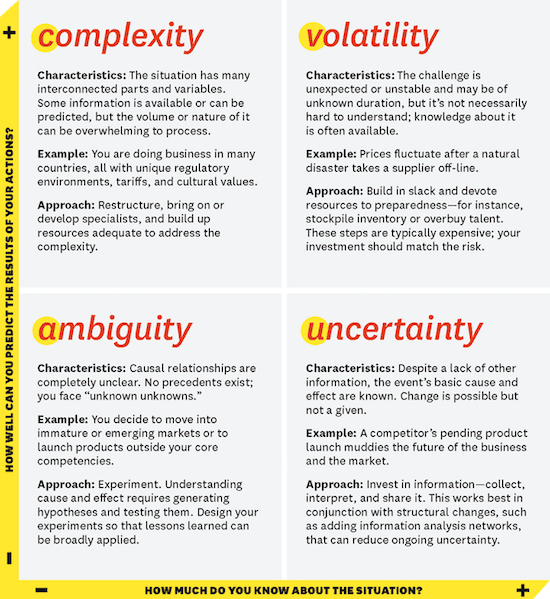
All this looks to me as if someone is strategically taking the VUCA-path (Volatility, uncertainty, complexity and ambiguity) to create shockwaves.

vuca_grid

Source: Harvard Business School Publishing
What VUCA Really Means for You

UPDATE 10.6.2015

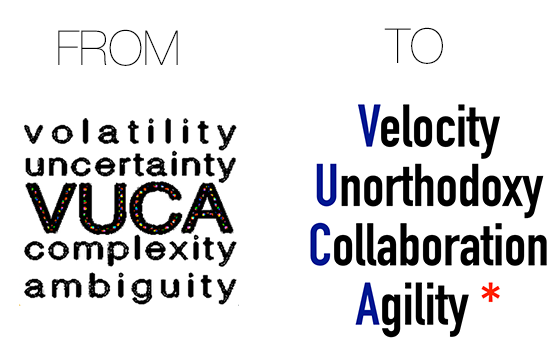
Gerd Leonhard thinks the future will be more successful approchaed using a different kind of of VUCA (see his PDF of a presentation) like the following gfx suggests…

vuca_trans

Why do I blog this? Ich bin etwas enttäuscht, vor allem aber auch besorgt ob der Abkehr von „Weniger ist Mehr“. Diese Uhr ist auch ein wenig Ausdruck von Größenwahn. Sie wird einige Abnehmer finden, das ist sicher. Vor allem die Leute die damit zum Ausdruck bringen dass sie Geld haben, werden diese Uhr als Spielzeug mögen. Eine Zeitenwende hin zu einem nützlichen Wearable ist das längst noch nicht. Und die unsinnige Vorstellung eines iPhone 6 plus zeigt, dass Apple nicht einmal seinen eigenen Ingenieuren mehr zuhört. Die User Experience Abteilung bei Apple muss für dieses Produkt vom Marketing offenbar bewusstlos geschlagen worden sein. Unfug auf höchstem Niveau.

Non-Blocking NSString-search using e.g. UITextField & UISearchViewController

caution_rant_450

Doing search is difficult. Usually you start to search for something if the stuff you have has reached an amount you cannot recognize any longer easily. You spend hours searching and finding the right things or do not even try searching for it because it is too much work.

Totally unrelated by @mattetti:
tweet_mattetti

That is what search was made for… theoretically. Nowadays „Search“ often means you have to type into a $textInputField somewhere and as soon as you start typing this damn thing starts searching EVEN ON THE FUCKING FIRST CHARACTER and blocks the UI i.e. the keyboard.

There are thousands of examples of this kind of behaviour but the worst thing at all is that these INSTANT-SEARCH-AS-YOU-TYPE consumes so much CPU on the MAIN THREAD (which usually is needed to drive the User Interface) that everything literally comes to a halt… EVEN THE FUCKING KEYBOARD. You simply cannot type the next character until the search comes back and has finished computing. I could kill developers for this kind of behaviour.

But whose fault is this? I would say Apple could definitely improve it’s own apps in this regard. So to ask Apple to fix this is asking a blind to see the colors. No! You need to fix it yourself! Get to know THREE small things, it is actually really only three (in numbers „3“):

You need to know 3 things

  1. MAIN THREAD
    Nearly 99% of your written code runs here. It drives also the UI. Computing intensive stuff like instant-search-on-typing placed here will degrade UXP dramatically.
  2. THREADS YOU CREATED
    The 1% of your code which does very computing intensive search runs here and NOT on the MAIN THREAD and IF YOU DO NOT TAKE CARE it consumes ALL THE CPU it can get. You need to teach it to make pauses.
  3. PAUSING WORK
    The 200 milliseconds you will definitely pause regularly in your computing intensive code to allow others (i.e. the MAIN THREAD) to get stuff done, too.

Things are not that complicated as you might think. But a lot of people post code that does not work and/or is wrong and has no easily understandable explanation why this is the right code and how it works in the details. If you read one piece of code to learn from, please read this answer on StackOverflow explaining how to avoid blocking the keyboard while you do searches.

Step 1: It boils down to YOU first giving MAIN THREAD some CPU-cycles before you even start with your computing intensive stuff. THIS IS IMPORTANT DO NOT EVER LEAVE OUT THIS STEP!!!

make_it_3dStep 2: Directly after you gave away some cycles to the MAIN THREAD you DISPATCH (other word for starting something, that continues to do stuff on its own afterwards) YOUR CREATED THREAD which will do computing intensive work.

Think about YOUR THREAD as a separate app that has nothing else to to with your app anymore. Since this separate computation starts within the blink of an eye it is so important you give some CPU-cycles to the other threads BEFORE you start your work, because your threads will be started FROM THE MAIN THREAD, and the MAIN THREAD wants to immediately continue with its work after you DISPATCHED YOUR THREAD. In this case (keyboard events) the computing intensive operation gets started over and over again. This is the second reason you need to add PAUSES.

Step 3: Inside YOUR THREAD you will hit a point (hopefully!) where all computation is done and finished. Usually something should happen with the result now. You now need to communicate from YOUR THREAD (…again, that is best thought of as a separate app) to your real app aka the MAIN THREAD. There is only one recommended way to do this, you have to tell the MAIN THREAD that it should do something now for you. You just give the MAIN THREAD a job ticket from within YOUR THREAD, so it knows what to do with your results.

Sample Code that works!

Here come some sample code I actually use successfully on the iDevices. Recognize that the simulator is not really the place you test this. Please recognize the highlighted lines 52,60,63 and 77, where all the thread-related magic happens.

/* YourViewController.h */
@interface YourViewController : UIViewController <UITextFieldDelegate> {

    BOOL isSearchInProgress;
    BOOL wantsAnotherSearch;
    NSString *stringToSearchForWhenCompleted;
}

@property ( nonatomic, assign ) BOOL isSearchInProgress;
@property ( nonatomic, assign ) BOOL wantsAnotherSearch;
@property ( nonatomic, retain ) NSString *stringToSearchForWhenCompleted;

@end

/* YourViewController.m */
@implementation YourViewController

// SOME STATUS VARIABLES WE NEED TO SYNTHESIZE
@synthesize isSearchInProgress;
@synthesize wantsAnotherSearch;
@synthesize stringToSearchForWhenCompleted;

- (void) refreshUiWithItemsFound:(NSArray*)itemsFound {
    // UPDATE YOUR UI HERE!
}

- (void) searchForStringAsync:(NSString*)string {
    if( !string || [string length] == 0 ) {
        [self refreshUiWithItemsFound:[NSArray array]];
        return;
    }
    
    if( isSearchInProgress ) {
        // IF ONE SEARCH-THREAD IS ALREADY IN PROGRESS DO NOT TRIGGER ANOTHER
        // INSTEAD STORE THE STRING AND REMEMER WE NEED ANOTHER SEARCH
        wantsAnotherSearch = YES;
        self.stringToSearchForWhenCompleted = string;
        return;
    }
    stringToSearchForWhenCompleted = nil;
    // REMEMBER WE HAVE OFFICIALLY HAVE A COMPUTING INTENSIVE
    // ACTION RUNNING ALREADY
    isSearchInProgress = YES;
    
    // USUALLY YOU HAVE SOME DATA SOMEWHERE ALREADY
    // THIS IS JUST DEMO/EXAMPLE DATA HERE...
    NSArray *itemsToSearch = @[@"The",@"quick",@"brown",@"fox",@"jumps",@"over",@"the",@"lazy",@"dog"];
    
    // STEP 0: CREATE YOUR THREADS QUEUE
    //         (THINK PACKAGING FOR YOUR JOB TICKET)
    dispatch_queue_t searchTextQueue;
    searchTextQueue = dispatch_queue_create("myFancySearchTextQueueJobId", DISPATCH_QUEUE_CONCURRENT);

    // CPU-CYCLES MEASURE NANOSECONDS SO WE
    // NEED TO BE VERY PRECISE HERE, D'OH!
    double pauseTimeInMilliseconds = 200.0;
    int64_t pauseTimeInNanoseconds = (int64_t)( pauseTimeInMilliseconds * NSEC_PER_MSEC );
    
    // STEP 1: GIVE SOME TIME TO MAIN THREAD FIRST (!!) I.E. KEYBOARD UI
    dispatch_time_t pauseTime = dispatch_time( DISPATCH_TIME_NOW, pauseTimeInNanoseconds );
    
    // STEP 2: SEND/DISPATCH OUR JOBTICKET TO OUR OWN THREAD QUEUE
    dispatch_after( pauseTime, searchTextQueue, ^(void) {
        NSMutableArray *myItemsFound = [NSMutableArray array];
        for( NSString* currentItem in itemsToSearch ) {
            NSString *stringToSearch = ((YourCustomObjectYouIterateOver*)currentItem).someStringProperty;
            if( [stringToSearch rangeOfString:string options:(NSCaseInsensitiveSearch|NSDiacriticInsensitiveSearch)].location != NSNotFound ) {
                [myItemsFound addObject:currentItem];
            }
            if( wantsAnotherSearch ) {
                // CANCEL SEARCH-FOR-LOOP BECAUSE WE HAVE NEW REQUEST
                break;
            }
        }
        if( !wantsAnotherSearch ) { // SKIP UI REFRESH
            // STEP 3: COMMUNICATE RESULTS TO MAIN THREAD TO UPDATE THE UI
            dispatch_async(dispatch_get_main_queue(), ^{
                [self refreshUiWithItemsFound:myItemsFound];
            });
        }
        // STEP 4: DO SOME CLEANUP AND CHECK IF WE NEED TO
        //         TRIGGER NEXT SEARCH IMMEDIATELY
        isSearchInProgress = NO;
        if( wantsAnotherSearch ) {
            wantsAnotherSearch = NO;
            [self searchForStringAsync:stringToSearchForWhenCompleted];
        }
    });
}

The sample code shows two methods I implemented in my own code of an app that features an instant-search-as-you-type-inputfield. It searches items for some matching string and returns the matching items, then it updates the UI. It works like a charme.

I have bound my searchForStringAsync: to a value-changed-event I got from a UITextField, but you can take any other event you like. Usually each keystroke while typing is ONE SUCH EVENT. So events are coming in quite often while typing. The method refreshUiWithItemsFound: is just an example to update the UI after the result is ready, you can call whatever you like. You could also decide to not refresh the UI immediately at all but instead wait until the results have consolidated (i.e. typing events stopped for some time).

Though this is a pretty fine working approach, it is not perfect yet. You may need to adjust the pauseTimeInMilliseconds-value to achieve good results depending on the amount of processing going on on the MAIN THREAD.

Known issue: Working with objects coming from MAIN THREAD in a different Thread (i.e. OUR CREATED THREAD) is only allowed/recommended read-only. As soon as you start writing/manipulating stuff/objects across threads you need to find ways the BOTH THREADS do not interfere accessing objects concurrently.

CREDITS

I want to thank someone here for the valuable insights I got from his understandable SO-post. Thanks Mathieu!

thank_you_250

A huge thank you to Matt D’Amours (other website, github) from Canada for his excellent explanation on StackOverflow, which made me learn the PAUSE-Feature of threads.

Have some fun!

And please implement searches this way in the future!

Update & Enhancement on SEP, 8th 2014:

Talking to @arepty (Alexander Repty) and @ortwingentz (Ortwin Gentz) to reassure myself, that I am not talking total rubbish here, I want to add the following thing.

  1. Ortwin pointed out that an option to cancel stuff would be valuable. So I added a cancel option to the THREAD CREATED because as soon as another search should be triggered, we do not need to wait until the running search is ready. We solve this with the already existing BOOL-flag wantsAnotherSearch. You cannot easily cancel a YOUR THREAD from outside, but you can check inside the loop if you better should stop useless work going on. An even better solution propagated by Ortwin is to actually monitor typing on the keyboard more closely and wait several milliseconds until we detect some USER-STOPPED-TYPING situation and only THEN start searching. This is e.g. very important if your search requests are very costly e.g. network-search-queries.
  2. Alex pointed out that even if you give the MAIN THREAD some time before you start, you have to be aware that we did run our iOS-code in a CPU-Single-Core-Environment for some time, but this time came to an end when the A5 chip was introduced, followed by A6, A7, and soon A8. That means, we only get some kind of „pseudo“-threads to dispense CPU-time in slices a bit better between different jobs going „kinda fake-parallel“ on single cores (read WP-entry for Multitasking and WP-entry for Multithreading). There was no second CPU in your iDevice some time ago which was able to execute the thread, so even running our own CREATED THREAD did not protect us against UI blocking. If we used too much CPU-cycles stuff got BLOCKED/DEGRADED even with threads. BUT since we have Dual-Core-CPUs since the A5 chip, you will need to do a lot of work now to bring current iDevices down. Read more about this in WP-entry about Apple System on a Chip.
  3. My conclusion from Alex pointing out the CPU-Single-Core-issue is to make even more PAUSES. So maybe it is a good idea to let our THREAD make PAUSES using dispatch_time in conjunction with dispatch_after every 100 iterations in the search-loop. I think this is a viable option, though your code will then look even more fragmented, d`oh!

Oh, and Oliver Jones aka @orj has also the same thing using NSOperation and NSOperationQueue, so pls give it a try if you dislike this code, but don’t do search without threads anymore, okay?

Ray Wenderlich aka @rwenderlich has another nice piece on Grand Central Dispatch (GCD), too.

Update

Together with Alex I setup a small demo app on github to demonstrate also the use of NSOperation. Have fun with it and make use of it!

Why do I blog this? Because I am angry about all those input-fields I have to use which have UI-blocking searches going on. Even Apple’s own Apps like the AppStore app are annoyingly blocking the UI when doing searches or other things. It’s an awful UXP! People can do nothing but wait until the blocking computing intensive task ended. In the meantime the keyboard is NOT working anymore. I want a lot of people to just copy this code and use it, so I do not need to use crappy search-/input-textfields anymore in the future.

Good Design — No Good Design

dieter_ramsI found this nice post about „Dieter Rams: ten principles for good design“:

Back in the early 1980s, Dieter Rams was becoming increasingly concerned by the state of the world around him – “an impenetrable confusion of forms, colors and noises.” Aware that he was a significant contributor to that world, he asked himself an important question: is my design good design?

As good design cannot be measured in a finite way he set about expressing the ten most important principles for what he considered was good design. (Sometimes they are referred as the ‘Ten commandments’.) […]

Ten principles for good design:

  1. Good design is innovative
  2. Good design makes a product useful
  3. Good design is aesthetic
  4. Good design makes a product understandable
  5. Good design is unobtrusive
  6. Good design is honest
  7. Good design is long-lasting
  8. Good design is thorough down to the last detail
  9. Good design is environmentally-friendly
  10. Good design is as little design as possible

Now I am baffled:
Leaving out innovation and aesthetic or even thorough down to the last detail I ask myself…

  • Is iOS 7 frosted glass effect useful?
  • Is iOS 7 frosted glass effect unobtrusive?
  • Is iOS 7 frosted glass effect honest?
  • Is iOS 7 frosted glass effect long-lasting?
  • Is iOS 7 frosted glass effect environmentally-friendly?
  • Is iOS 7 frosted glass effect as little design as possible?

I think NO!

Why do I blog this? I think iOS 7 frosted glass effect ist no good design. And I am on a crusade to prove it since the first pictures of this fancy stuff appeared on Apple’s website.