30c3 – speechless – postsnowden – #NSA

30c3_nuclear_strike_550

Der 30c3 (30igster Chaos Communication Congress) ist vorbei und der größte Congress geworden, der vom CCC e.V. meines Wissens initiiert wurde. Ich weiß zwar nicht ob die Camps noch größer sind/waren (weil ich selbst noch nie geschafft habe hinzufahren), aber über 8000 Leute im Congress Center Hamburg (irgendwo habe ich erschrocken 9000 gelesen) sind eine ganze Menge Menschen. Zum Vergleich, Apple’s WWDC Konferenz hat „nur“ ca. 5000 Entwickler, die in das Moscone Convention Center passen. Und da kommt auch schon gleich ein kleines Bedenken bei mir hoch… wenn das Wachstum so weiterläuft (gleich mal die doppelte Besucherzahl im Vergleich zum BCC vor 2 Jahren) wird es schnell wieder eng werden und ganz, ganz neue Probleme werden auftauchen.

Ich bin mal wieder wahnsinnig beeindruckt wie allein bei dieser Zahl an Congress Teilnehmern dennoch alles nahezu reibungsfrei skaliert hat (gut, jetzt mal von einigen GSM Aussetzern und einem vollkommen unerreichbaren Wiki abgesehen; für`s Wiki gab es ja einen Read-only-Mirror), die Streams liefen sagenhaft stabil, nur DVB-T hätte die noch stabiler machen können. Was manchmal nicht lief war das Wireless Netz für Non-5GHz-User wie ich bei anderen mitbekam die ältere WLAN-Karten drinne hatten. Ich hatte aber vor allem den Eindruck, dass insbesondere die koffeinhaltige Getränkeausgabe dieses Jahr eine deutlich geringere Latenz hatte. Hier gibts ein paar schöne Impressionen auf flickr.

Veränderungen/Diffs

Es gab mehr Platz. Das Hackcenter, das ja so ein wenig das Epizentrum des Congress bildet bekam einen eigenen neuen Raum. Letztes Jahr verteilte sich das alles etwas mehr dieses Jahr war es dadurch schön konzentriert. Die unerreichte Low-Light-Atmosphäre (man hatte und behielt seine Nachtsichtigkeit) des Hackcenter im BCC wollte bei mir jedoch nicht aufkommen. Für meinen Geschmack war das alles viel zu hell ausgeleuchtet. Damit ging irgendwie der heimelige und ein wenig „hier passieren Dinge“-Aspekt des Hackcenter verloren. Ich würde mir mal wieder eine richtig schön dunkle Hack-Area wünschen. Maximal mit Rotlicht, Schwarzlicht und VJ-Projektionen gestaltet. Das Ideal wäre natürlich Lounge und Hackcenter in einem Raum in dem man auch Tabak konsumieren darf, genug Strom hat und nicht unbedingt auf dem harten Boden sitzen muss.

Die Lounge war allerdings schon eine echt krasse Sache. Die war toll, wenn auch dieses Jahr mehr so Dancefloor als Lounge, was aber gar nicht geschadet hat. Im Gegenteil, wer kann schon von sich behaupten, dass er schonmal auf einem Wasserwerfer der Polizei getanzt hat. Das hat großen Spaß gemacht!

30c3_cch_sunshine

Weitere große Änderung war die Konzentration der Food-Versorgung im Basement. Die war durchgängig höchst funktional, wenn man nicht gerade mit einem der Besucherschwälle aus einer Saalentleerung in die Food-Area einzog, war die Wartezeit ebenfalls gering. Aber das lief auch im BCC eigentlich immer super. Letztes Jahr gab es noch über die Etagen verteilte Foodspots. Zum Beispiel mit lecker Hamburgern in der 1. oder 2. Etage. Die hab ich ein wenig vermisst muss ich sagen.

Das Beleuchtungsbild des Congress Center von außen sah nahezu identisch zum letzten Jahr aus. Allerdings war dieses Jahr das H von CCH mit einer perfekten Schablone eines identischen C überdeckt. Ansonsten sah aber alles wirklich recht vertraut und ähnlich aus… bis auf die Seidenstraßen-Route die sich außen am Gebäude entlang schlängelte.

Assembly/Stickiness/Stasis

OpenSeaMap-Logo-2000pxDa ich dieses Jahr tatsächlich die ersten 2 Tage viel in der Assembly war und kaum in Talks, habe ich oft auf die Streams zurückgegriffen, was super klappte. Aber ich hab auch echt gemerkt, dass ich mal wieder ein Floatie sein möchte. Die Assembly nagelt einen fest… zu wenig Chaos… zu wenig Kabelsalat… zu wenig Drogen… zuwenig neue Leute… zu wenig von allem.

Na ja, dafür hat die Assembly was bewegt. Hoffe ich. Die OpenStreetMap war super besucht zu fast jeder Zeit. Das war schon wieder recht beeindruckend. Aber man kommt sich dann halt auch eher so vor wie der Erklärbär nach zwei Tagen. Es ist mir ganze zwei mal passiert, dass ich das Essen vergessen habe und dann mit Kopfweh nicht unter 3 Stunden bestraft wurde. Dafür brauche ich noch einen Hack für den nächsten Kongress. Vielleicht lag das aber auch an der Konzentration des Food im Basement.

Einmal mehr habe ich bemerkt, dass „Congress ist, was du draus machst.“ also die Erfahrung die man macht hängt echt so stark von einem selbst ab, und eher wenig von anderen. Zwar auch ein wenig von anderen, aber ausschlaggebend ist echt was man selbst tut.

Gilt sonst im Leben eher:

Life is 90% how you take it and 10% how you make it!

Gilt für den Congress mehr:

Life is 10% how you take it and 90% how you make it!

Sich treiben lassen halte ich immer noch für eine der effizientesten Methoden die Vielfalt des Congress zu erfassen und Eintauchen zu können. Aber dafür muss man dieses Loslassen von Plänen erstmal bewerkstelligen. Das ist durch den Alltag so zur Gewohnheit geworden, und diese Gewohnheit steht einem hier teilweise stark im Weg. „Go, float!“ rufe ich daher für den kommenden 31c3 aus.

Speechless…

Das Programm der talks hat mich völlig geflasht dieses Jahr. So eine hohe Qualität (bei den talks die ich bisher angesehen habe)! Ich habe nur gute bis sehr gute Vorträge gesehen. Die Beiträge rund um postsnowden haben mich einmal mehr sprachlos zurückgelassen. Es fühlte sich an wie ohnmächtig einem Nuklearsprengkopf beim Einschlag und langsamen Explodieren in Superzeitlupe inmitten der Gesellschaft zuschauen zu müssen. Ohnmächtig! Sprachlos! Was die Vereinigten Staaten hier anstellen (und dabei ist ja nichtmal klar, was Russland & China & Japan so treiben…) ist eine so massive Weltherrschaftsfantasie die Realität geworden ist… das einem schlicht die Worte fehlen.

An dieser Stelle möchte ich auch Andreas Bogk ein wenig widersprechen, der Hacking für sich mal (in einem Blinkenlight Interview) definiert hat als „Hacken ist Science Fiction Wirklichkeit werden zu lassen.“ #postsnowden kann man das nicht mehr so ohne Zusatz stehen lassen. Ich bin ebenso fasziniert von Science Fiction, aber wie bezeichnet man das, was die Geheimdienste da abgezogen haben? Die haben Sachen Wirklichkeit werden lassen, die wirklich schlimm sind und bis vor einiger Zeit auch in das Reich der Science Fiction gehörten. Wie mir scheint, teilen die Geheimdienste die Definition des Hacking mit uns mehr als uns lieb ist, allerdings als Most Evil Black Hat in town.

…und trotzdem superb.

artwork_30c3…den Congress hat der Geheimdienst auch diesmal nicht zerstören können. Es war toll! Das Mehr an Platz im Basement für die vielen tollen Projekte der Hackerspaces, das Mehr an Platz für eine wundervoll gestaltete Lounge, die Seidenstrasse, nicht zu vergessen das stark verbesserte Ticketingsystem, die vielen vielen shared space tables an denen sich die Free Floaties niederlassen konnten… die Hammer Eröffnungszeremonie mit dem unglaublich auf den Punkt gebrachten Audiokunstwerk von Alec Empire (Atari Teenage Riot)… groß-art-ig!

Ergänzt um ein extrem cooles Videokunstwerk von fRED.

30c3_saal1_setup_opening
Quelle: Website/Blog von fRED

Ich bin dieses Jahr einen Tag früher zum Congress gekommen und habe die Assembly schonmal vorbereitet mit Deko (Lichtern, Tischdecke, Strom, Netz) und weiteren Stromverteilern unter dem Tisch und dem iPad Presenter für die OpenStreetMap & OpenSeaMap Demos. Das war überaus sinnvoll, denn sonst hätte ich mich nicht am kommenden Tag um meine zwei Mentees von den Chaospatinnen kümmern können. Oh, und ein Hotel in der Nähe macht den Congress soviel angenehmer… letztes Jahr war ich in einem weit entfernten Hostel… das war sehr anstrengend und erhöhte das Schlafdefizit deutlich.
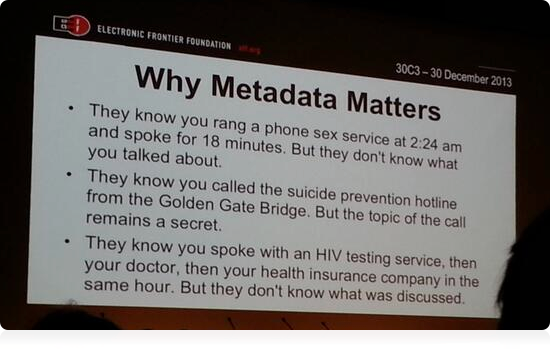
Metadata

metadata_matters
Quelle: Fast 5000 Retweets von @pinkflawd’s tweet
Stammt aus Vortrag von Kurt Opsahl: „Through a PRISM, Darkly“

Media

Wer den Congress, den man schon ein wenig als Wendepunkt ansehen kann, mal in der Nachbetrachtung sehen möchte, der ist mit folgenden Links ganz gut dabei (Warnung, kostet ohne Ende Lebenszeit!!!):

Links Audio/Video Bilder
  • Fahrplan
  • Lighting Talks
  • Presse Review
  • XBMC
  • Fingerabdrücke und so
  • Quantencomputing
  • CDN 30c3 Streams
  • Congress Opening Hymne
  • Eventifier Videos
  • Stream Downloads
  • Opening Video Raw
  • Flickr Group
  • Flickr Suche
  • Eventifier Fotos
  • Fazit

    Ein großer Congress war es! Bunt, vielfältig und mit vielen schlechten Nachrichten in den talks. Aber im Prinzip war das vorher klar!

    Doch was folgt jetzt auf diesen postsnowden Schock? Wir können doch jetzt nicht einfach so zur 31c3 Planung übergehen und uns damit beschäftigen welches T-Shirt Motiv für den 11111C111 verwendet werden soll, oder? Aus diesem Schock sollte doch etwas folgen! Für mich war der 30c3 eigentlich die Death Knell für unsere Zukunft als freie Menschen die laut und unüberhörbar auf dem ganzen Congress schlug.

    Wie geht es jetzt weiter? Das ist für mich die große offene Frage die wie ein Elefant im Raum steht. Was tun wir jetzt? Wie kommunizieren wir jetzt und in Zukunft? Wo liegen die Ursachen für diese ganze Misere? Wo sind die Schwachpunkte dieser schlimmen Entwicklungen? Wie bekommt man das noch eingefangen? Ist es unsere Aufgabe das einzufangen? Wer hilft dabei mit? Wer kann mithelfen? Womit? Wann? Mit was? Der Congress lässt mich mit vielen offenen Fragen zurück…

    Das hat der heute-Beitrag übrigens ganz gut erkannt:

    Angesichts von Bedrohungen wie der totalen Überwachung der Kommunikation durch die Geheimdienste, fragen sich auch die Hacker: Was soll ich tun?

    hackerethik (eine von mehreren) stand mehrfach im Fokus zum selber mitgestalten.

    http://bit.ly/30c3declaration

    Nachtrag zu Chaospatinnen

    Das Mentoring war eine neue Erfahrung für mich, bei der ich selbst tatsächlich auch ein wenig gespannt war wie es wird. Die zwei Mentees die ich offiziell über den Congress führte und mitnahm auf die Reise ins Chaos blieben allerdings nicht die einzigen. Inoffiziell habe ich zwei weitere Erstbesucher gementored, völlig unter dem Radar der Chaospatinnen. Die tauchen also auch in keiner Chaos-Statistik auf. :)

    Ich muss allerdings sagen, dass ich das Mentoring nicht noch einmal machen werde und zwar aus diversen Gründen von denen ich hier nur einige wenige skizzenhaft erläutern möchte. Der Congress & Ich waren im Prinzip nicht vorbereitet darauf und an der Reaktion der Hackcenter-Tables merkte ich, dass diese auch nicht so richtig wussten was ich da grade tue mit den beiden Mentees im Schlepptau. Kenne ich ja selbst, wenn da jemand auftaucht und erzählt, ist das etwas ungewöhnlich und wirkt wie ein Fremdkörper. Aber grade diese Fremdkörpererfahrung ist eine ganz sensible Sache auf dem Congress, denn Vertrauen können ist sehr wichtig geworden und sowas macht erstmal misstrauisch, wenn da ein Pulk fremder Leute gezielt Dinge ansteuert. Normalerweise setzt man sich halt einfach mal als Teilnehmer und fragt dann was wenn jemand grade Zeit hat, halt free floating. Ein wenig Anleihe beim Herrn Prof. Flechsig hätte ich ja vielleicht machen können, z.B. bei der Famulatur, aber dann hätte ich auch Free-Floatie sein müssen den ganzen Congress über.

    Famulatur, die: Hierbei eignen sich zumeist jüngere Praktiker (Ärzte, Künstler, Wissenschaftler) spezielles oder seltenes Wissen von hoher Qualität an, indem sie einem „Meister seines Fachs“ bei dessen Arbeit über einen längeren Zeitraum helfen.

    Ich bin da sehr gespalten, ob die Chaospatinnen den Congress an sich weiterbringen oder weitergebracht haben. Fiona ist der Ansicht das dies sehr positiv war, viele andere pflichten bei. Kritik gibt es merkwürdigerweise keine? (Vielleicht weil sie die Kommentare in ihrem Blog zu dem Post schonmal vorsorglich deaktiviert hat?) Mein Grund warum ich keine weitere Kritik hier formulieren werde liegt in dem starken, feministischen Einschlag der Projektinitiatorinnen begründet und den damit verbundenen Kommunikationsschwierigkeiten.

    Ich denke das Projekt ist auch eine sehr starke Domestizierung des Chaos, und somit eine eher unnatürliche und für die Community untypische Art und Weise sich den Congress zu erschließen. Für extrem schüchterne Naturen und Autis mag das im Grenzfall sinnvoll sein, aber ich habe schon ein wenig den Eindruck gehabt, den beiden Mentees eigentlich etwas unvorbereitet und völlig unnötigerweise meine subjektive Sicht der Dinge aufgedrängt zu haben. Das war nicht gut und fühlte sich auch nicht gut an! Mehr Chaos und Selbstwirksamkeitserleben wäre bestimmt viel gesünder gewesen. Aber da bin ich auch nochmal auf das Feedback der Mentees gespannt. Jedenfalls teile ich die doch recht überschwängliche Bewertung von Fiona nicht, weil sie die Auswirkungen auf die gesamte Community und insbesondere den Community-Kern aus der Betrachtung ausklammert. Ein unbegrenztes Wachstum dieses Projekts dürfte dem Congress auf Dauer nicht gut tun. Da kommt es sicher auf das richtige Maß und die richtige Zielgruppe an.

    Mir gefiel allerdings überhaupt nicht der Umgangston, den Fiona mit mir als Pate bzw. Mentor und damit Projektunterstützer gepflegt hat. Alle Kommunikation war Top-Down und Personal Message-only, es gab keinerlei Transparenz was eigentlich passierte und keinerlei Mitwirkungsmöglichkeiten außer „Friss-oder-Stirb“. Auch der Umgangston in den Mails war mehr als ungewöhnlich, denn durch die vonFiona gewählten Formulierungen kam es mir vor als wollte man uns/mich dazu bringen, sich wie ein Kind zu verhalten, damit widerum Fiona uns/mich wie Kinder behandeln konnte. Ich bin ein erwachsener Mensch und so möchte ich auch behandelt werden, aus Rücksicht auf die zu betreuenden Besucher habe ich mich dennoch zurückgenommen und mich um die mir nach einem intransparenten Verfahren zugewiesenen Besucher nach bestem Bemühen gekümmert. Das war allerdings das erste und allerletzte Mal!

    Update 28.1.2014
    Bin heute nochmal auf den Beitrag der taz aus 2010 gestossen worden „Jahreskongress des Chaos Computer Club: Der Innenminister als Troll“, da es heute ja wieder ein solches Gespräch gab, den BMI Dialog bzw. „Auf­takt­ge­spräch zur Di­gi­ta­len Agen­da: Bundesinnenminister de Maizière eröffnet gesellschaftspolitischen Dialog“ (Video der Begrüßung auf YouTUBE; nein leider kein Mitschnitt bisher, Depublizierungsschutz).

    symbolbild_bmidialog_550

    Angesichts der wunderschönen Wortschöpfung von Sascha Lobo mit dem Begriff „Sicherheitsesoterik“, empfehle ich uns allen, diesen ganzen NSA/BND/GSHQ/FIVEEYES/USW. Kram einfach bei EsoWatch einzustellen ins Wiki für nachfolgende Generationen… standing on the shoulders of giants und so…
    …leider ist der Kollateralschaden dieser ganzen Esoterik ein hochwirksames Panoptikon. Aber das Esoterik zuweilen extrem gesundheitsschädlich sein kann und oft viel Geld kostet weiß man ja. Vielleicht sollte die Bundesregierung sich auch eine Wagenladung des Produktes „Hildegard Orgonakkumulator“ ordern (siehe auch Video). Damit ließe sich das gesamte Landwirtschaftsministerium einsparen.

    Update
    Einige verstreute Blogposts zum 30c3…

    Why do I blog this? Weil ich meine persönliche, höchst subjektive Sicht für die allgemeine Verbesserung zur Verfügung stellen möchte. Ich finde Rückmeldungen, Zusammenfassungen und Reviews zum Congress sind wichtig. Zwar gibt es das Feedback der talks und auch Gespräche in der Lounge mit dem Thema „Wie findest Du’s?“ sind geeignet, aber ein Blogpost lässt sich halt leichter referenzieren und vernetzen und ist nachhaltiger zugreifbar. Und es sortiert für mich auch nochmal den ganzen wilden Kram der da in 4 (5) Tagen passiert ist.

    Ach ja und eine ärgerliche Sache fällt mir da grade noch ein. Die iOS Fahrplan Apps – Ich hab ja selbst schon mehrere beigesteuert – die von diesem Jahr waren für mich leider aus diversen Gründen unbrauchbar. Erstens, war keine davon Open Source. #fail Zweitens hatte keine einen Support für die Sessions, Projects und Assemblies im Wiki. #fail Und dann war man drittens auch noch untereinander offenbar nicht gerade exzellent zueinander. Und viertens gab es wieder keine Möglichkeit Feedback zu talks über die App abzugeben. #fail

    Für viele war das App-Angebot sicher hilfreich und die scheinen auch solide und mit viel Engagement und Knowhow entwickelt worden zu sein. Dennoch konnte ich keine App vernünftig nutzen. Die Fahrplan App z.B. konnte zwar „vergangene Events“ wegfiltern, und damit die Komplexität etwas reduzieren, bloss verschwanden dann auch die Events die gerade erst vor Sekunden angefangen hatten. #fail Und die Megalange Liste an Events ist einfach zu unhandlich gewesen. Man wusste nie wo man eigentlich grade uhrzeit-technisch war. Das war alles schon mal gelöst als Problem in BarfBag und BarfBag ist vollständig OpenSource inklusive der Serverskripte für eine CronTab-basierte Caching-Layer sogar für Wiki-Seiten.

    Es fehlte mir da auch die Innovation, beide Apps haben die gleiche langweilige Listendarstellung gehabt. Unter Android gibt es z.B. eine App mit einer viel hilfreicheren Darstellung als Chartview mit allen Tracks. Ich habe daher stattdessen auf die Webseiten des Fahrplan zugegriffen (wenn das frab mal html ausgeliefert hat) und die Saalanzeigen in den Streams „Next Talk: $talk“ zum Orientieren genutzt; erstaunlich wie gut das ging. Für mich ist OpenSource für diese Art Apps schlichtweg unabdingbar.

    Zukünftig werde ich ausschließlich Open Source Apps nutzen. Alles andere kann mir gestohlen bleiben. Das beide Apps dann auch noch explizit Facebook-Support integriert hatten war dann im Prinzip noch das iTüpfelchen oben drauf. Facebook ist ja mal das exakte Gegenteil zu „Private Daten schützen, öffentliche Daten nützen.“ aber vielleicht werde ich auch nur alt und gruselig. Aber wenn selbst die GRÜNEN plötzlich Wahlcomputer toll finden wackelt das Wertesystem eh nicht mehr, es ist längst auf den Kopf gestellt worden…

    django – some first impressions

    If you would like to learn this stuff the professional way, you may try…
    Python

    Get into Python

    Get started learning Python with our Python Tutorial. This tool is intended for everyone who wants to learn Python programming language, whether your are a beginner or already a pro.

    TRY IT…

    django-logoSince I mastered the setup of my apache config to actually find my django project I experience some more fluent development happening.

    Actually I learned already a lot about the powerful namespacing pattern for URLs which frees up a lot of capacity you usually spend on fixing broken link experiences for users and wrapping your head around url-paths.

    Actually the url-handling via regex is a bit painful at first, but it turns out that this gives you extraordinary flexibility to create wonderfully simple and elegant looking urls which is a thing nowadays if you wanna be found in Google at the top ranks and provide useful permalinks e.g. for products whoich should be found easily.

    Also the template engine is very flexible. I can create a kind of loopholes (called blocks) in my base templates to prepare them to get stuff injected from lower level templates which is great. You could build a very complex site in no time and have things like header, navigation, content, footer easily setup and look consistently.

    Learning with the best tutorials

    After I did the painful 6-part tutorial, I just did another very good tutorial on youtube (and still executing on it). And boy was I happy to actually have learned things the „right way“ before. because in the youtube based tutorial above the guy explaining stuff there totally misses on the concept of url-namespacing. But see for yourself here:


    Source: Django Full Website Tutorial by hackedexistence.com

    If you know some excellent tutorials, e.g. on how to setup django for SSL-based deployment and the like, let me know in the comments.

    I also found some very helpful other links:

    Python tricks often appreciated

    During all my tinkering I also did used a lot of really useful operations using the manage.py command. E.g. today I just wiped my database to try repopulating it with stuff I dumped before. It was quite easy and which is good to have for experimenting and not loosing all your data. Just be careful you do not change the DB-scheme during these operations.


    python manage.py dumpdata > temp_data.json
    python manage.py flush
    python manage.py loaddata temp_data.json

    I also made a lot of use of following command:

    python manage.py shell

    This loads the whole project or in a way has all the settings needed setup for you. Some quick

    >>> from <myApp>.models import <myEntity>
    >>> dir(<myEntity>)

    Gave me really helpful insights, what the object I have actually is capable of doing, by displaying all the methods and attributes available.

    My bootstrapping file for Vagrant now was extended by a lot of useful stuff, but actually I did not destroy my VM recently so if all this works will be seen on the next setup of my VM using vagrant up.

    Content I added to my bootstrap.sh file:

    # SETUP FOR BOOTSTRAPPING
    apt-get update

    # INSTALL apache
    apt-get install -y apache2

    # INSTALL mod_wsgi
    apt-get install libapache2-mod-wsgi

    # INSTALL django
    apt-get install -y python-django

    # INSTALL python imaging library
    apt-get install python-imaging python-imaging-tk

    # INSTALL postgres & python db connector
    apt-get install postgresql python-psycopg2

    I also backed up my apache config files now to some place external to the VM (shared folder) so I do not loose all config stuff if I destroy the VM.

    Further education

    To gain some flexibility for my models I just started reading stuff like e.g. „33 projects that make developing django apps awesome“ and „Django database migration tool: south, explained“.

    south_logoSouth (start Tutorial here) looks like an elegant solution for my purposes because it provides intelligent schema and data migrations.

    The plain vanilla way to do migrations would be Django’s Evolution. But even they point out that South has become a De facto standard. Looks like some stuff was inspired by ActiveRecord from rails.

    So some line of
    sudo apt-get install python-django-south
    just made it fly. I like the ubuntu way of installing software… just to revert the action using
    sudo apt-get remove --purge python-django-south
    several minutes later because south was not correctly installed and better should have been installed through using pip.

    So doing a sudo pip install south to get the e x a c t same result. So must be some other error. Doing some googleing on that one… turns out south needs to be entered in the INSTALLED_APPS entry in the settings.py… nice that you find that on the documentation so easily. So this stackoverflow-line helped me out again:

    You probably haven’t added ’south‘ into the list of INSTALLED_APPS of your settings.py file

    But at least I now know the exact version of south installed. It’s 0.8.2 the one installed by apt-get was only 0.7.3, so I guess pip is the better way to fly. And now python manage.py did show:

    [south]
    convert_to_south
    datamigration
    graphmigrations
    migrate
    migrationcheck
    schemamigration
    startmigration
    syncdb
    test
    testserver

    Fine! Now that I got that installed the python manage.py syncdb changed its output to some new formatting which involves some south-magic. It now looks like:

    Syncing...
    Creating tables ...
    Creating table south_migrationhistory
    Installing custom SQL ...
    Installing indexes ...
    Installed 0 object(s) from 0 fixture(s)

    Synced:
    > django.contrib.auth
    > django.contrib.contenttypes
    > django.contrib.sessions
    > django.contrib.sites
    > django.contrib.messages
    > django.contrib.staticfiles
    > django.contrib.admin
    > south
    > shop
    > shopadmin
    > tinymce

    Not synced (use migrations):
    -
    (use ./manage.py migrate to migrate these)

    I just coninued to put my models under migration control using:
    python manage.py schemamigration <myapp> --initial
    Worked! But everything after that failed. Even a flush on the database did not help in any way. Hmm…
    Adding south to an existing project needs special handling…
    python manage.py convert_to_south <myApp>
    also learned that deleting the migrations directory is not that evil after all if „things go south“, haha.

    Migrations on the server

    At the same time I learned that there is a procedure for handling migrations perfectly on the server, its like this:

    1. Install South on server. import south from shell just to make sure you are using the same python env.
    2. Add ’south‘ to INSTALLED_APPS in settings.py
    3. Upload settings.py
    4. Restart (web)server
    5. python manage.py syncdb
    6. Upload new app/models.py and app/migrations/ dir
    7. Restart (web)server
    8. python manage.py migrate app --fake 0001
    9. python manage.py migrate app

    Good to know! Since I got some changes to my models waiting, I changed them now and handed over to south:

    python manage.py schemamigration myproject.myapp --auto
    python manage.py migrate myproject.myapp

    Worked like a charme… after fixing some modelissues (adding null=True) and providing default values for some Decimals. Great!

    Oh and if you have permission problems with your webserver directory in your VM managed by Vagrant, try adding following line in the Vagrantfile:
    config.vm.synced_folder "./", "/vagrant", :owner=> 'vagrant', :group=> 'www-data', :mount_options => ['dmode=775', 'fmode=775']
    This adds the directory to the group of the apache-users, so apache is allowed to write into those files. Here it is www-data-group but it may be different for your VM/Webserver combination.

    Localization

    Today I tried to use translated strings in my templates e.g. using following statement in one template
    {% trans 'Willkommen auf meiner Homepage.' %}
    you need to add
    {% load i18n %} at the top of each template file and below any base-template statements.
    using django-admin.py makemessages -l de --all
    I tried to create localizationfiles for my app. But that did not really work because I needed to create locale-dirs first in my project.
    And then I got the famous error:
    CommandError: Error running xgettext. Note that Django internationalization requires GNU gettext 0.15 or newer.
    which I fixed using the ubuntu SW installation manager by typing
    sudo apt-get install gettext
    and adding it to the bootstrap.sh for my VM.

    Then after entering
    django-admin.py makemessages -l de --all
    which created a .po-file in my project
    locale/de/LC_MESSAGES/django.po
    Repeating the same procedure for english language revealed another folder for en. But…
    that alone was not sufficient by far. You need to do a compile on the locale files before you even have a chance of seeing translation happen.
    django-admin.py compilemessages and in my case
    I also needed to add the LOCALE_PATHS to actually find my locale dir in the project, i have no clue why it does not find that automatically as advertised.

    Authentication and sending mails

    In the meantime I implemented registration/login/logout and user profile. Following my tutorials I just took django’s default implementation of how to reset passwords for user accounts. That’s when I hit the next wall. But that was really an easy one. If you want to send mails you need a mailserver. After some googeling i went with postfix for testing:
    sudo apt-get install postfix
    made this work, otherwise I saw an error which pointed me directly towards the problem. I need to remember this for deployment to actually install a maiserver which is stable and configure it in the settings.py according to this and this and during development maybe this.

    Actually I would prefer to just setup the following settings:

    EMAIL_HOST = 'localhost'
    EMAIL_PORT = 1025

    and then type
    python -m smtpd -n -c DebuggingServer localhost:1025
    this prints emails which are normally sent via any configured mailserver to the console to debug its content and headers. Very useful!!!

    Other useful stuff I discovered during my voyage… (basically I just store all the open tabs on my browser here, because I need to reboot the machine for some hardware driver I need to install which needs a reboot of my mac.)

    Wow, the new device driver fixed my issue with this gaming mouse. The default behaviour of the Cyborg R.A.T. 9 mouse is really pretty ugly. Have a look at this enormous proof of how MadCatz actually doesn’t even care about any Mac customer. Actually you should not buy anything from a company which behaves silly as this. It renders your mousepointer nearly useless. Since Cyborg did never provide any fix for the missing OS X driver and installing the old driver for OS X 10.6 renders completely crazy issues with the mouse… I went with USB Overdrive now. And wow it seems to fix the issues. I cannot manipulate the 3 different setups of the mouse, but I can pretty much freely configure any other button and all scrollwheels now. Great thanks to USB Overdrive! BTW: here is a great review of USB Overdrive.

    Taking a REST

    Today I started opening up my small website using some REST API. I started installing necessary stuff following instructions over here by typing:

    sudo pip install djangorestframework
    sudo pip install markdown
    sudo pip install django-filter

    Wow!!!! Blown away just another time! REST-API support in actually no time. Haha, how cool is that?

    By working my way through the tutorial on how to JSONify stuff, I created my own apiviews.py (I did not want that API stuff in my regular views) and then I just setup the urls.py with som additional info. (meanwhile I found myself trying to close a browser tab by typing :q in the window, perhaps it is time for vimperator…). I used the python interactive shell to actually experiment with the stuff in the tutorial. Which is really perfect to get to know the details of how JSONParser and JSONRenderer actually work, i.e. using a stream created with StringIO.

    So in the end this took me just one day to grab the concept of JSON-api-ifying my django app to get at least a stable READ-ONLY api. But now I will go on and work on the READ,CREATE,WRITE,DELETE stuff which will involve some validations of incoming JSON and objects created. We will see…

    BTW: Meanwhile I just found another nice Video Tutorial on the Python/Django stuff. Looks also very clear in its explanations and also provides some much better input about the background of how django works. So definitely worth a try, though the guy smartly „skips“ (edited out of the video) several very delicate things (like installing the mySQL amd mysql-python, haha).

    Update
    To make my own experience on video-tutorials as comfortable as possible I just hacked myself a website for one of the tutorial series. It allows to insert any video-id from youtube and will allow free resizing of the video display. Also I preprogrammed the HackedExistence ID’s for you already. So convenience is just 1 click away.

    To be continued…

    django – doing webstuff without WO or RoR

    Coming from WebObjects

    norails_nowebobjects2I once was very good at building WebApplications and Backends. I used to be a WebObjects (WO) developer. You may have never heard of WebObjects though it basically runs the complete AppStore and several of Apple’s backends for developers. One of my most successful WebObjects solutions was EverLearn, a learning environment for universities. There is still one instance of it running at LMU Munich.

    But to deploy WebObjects you have to jump through a whole lot of loops and WebObjects today is not supported with the necessary tools and IDE’s by anyone but some OpenSource guys around Project Wonder which build and maintain eclipse plugins. But working with eclipse…? No it isn’t really fun at all. But there are still guys around who use it.

    Hello python & django

    So I now came to the conclusion I need some reliable backend solution which is:

    1. Easy & quick to learn and has some value beyond backend code (Python helps here)
    2. Easy to maintain & find some support for in a high fidelity community
    3. Easy & quick to deploy on any kind of box out there
    4. Deploys also on large scale infrastructures easily (say Google AppEngine)
    5. Not involving any ruby and ruby on rails stuff (because I hate the syntax of it a lot!)

    So I will now describe my journey of how to bootstrap django skills from exactly NO SKILLS at all about python and django. We will see… (BTW you find a nice large django logo here)

    Entry vector python

    django-logoI started on the website called https://www.djangoproject.com/ and searched for some quick guide to start. I found the Quick install guide. I entered man python on my terminal, I recognized that I need to be more specific and I typed again man python2.7 and wow it was already installed and said:

    PYTHON(1)

    NAME
    python – an interpreted, interactive, object-oriented programming language

    SYNOPSIS
    python [ -B ] [ -d ] [ -E ] [ -h ] [ -i ] [ -m module-name ]
    [ -O ] [ -OO ] [ -R ] [ -Q argument ] [ -s ] [ -S ] [ -t ] [ -u ]
    [ -v ] [ -V ] [ -W argument ] [ -x ] [ -3 ] [ -? ]
    [ -c command | script | – ] [ arguments ]

    DESCRIPTION
    Python is an interpreted, interactive, object-oriented programming language that combines remarkable power with very clear syntax. For an introduction to pro-
    gramming in Python you are referred to the Python Tutorial. The Python Library Reference documents built-in and standard types, constants, functions and mod-
    ules. Finally, the Python Reference Manual describes the syntax and semantics of the core language in (perhaps too) much detail. (These documents may be
    located via the INTERNET RESOURCES below; they may be installed on your system as well.)

    Python’s basic power can be extended with your own modules written in C or C++. On most systems such modules may be dynamically loaded. Python is also adapt-
    able as an extension language for existing applications. See the internal documentation for hints.

    Documentation for installed Python modules and packages can be viewed by running the pydoc program.

    […]

    AUTHOR
    The Python Software Foundation: http://www.python.org/psf

    INTERNET RESOURCES
    Main website: http://www.python.org/
    Documentation: http://docs.python.org/
    Developer resources: http://www.python.org/dev/
    Downloads: http://python.org/download/
    Module repository: http://pypi.python.org/
    Newsgroups: comp.lang.python, comp.lang.python.announce

    Installing django (part 1)

    I click the link with Install an official release on it. Oh and there we have it again… the stuff that always confuses me in installation procedures. I need to install another tool to beeing able to install django. Installation Inception or Installation Dependency Galore. Anyway I just continue… installing pip which stands for „A tool for installing and managing Python packages.“. Oh and there we have it, the next inception iteration „pip requires setuptools and it has to be installed first, before pip can run.“ yay, who would have thought…

    Installing setuptools

    okay lets go… I download ez_setup.py which looks to me like a python script which will do the work to install pip? But this is just wild guessing. The red security warning right next to the download link just confuses me. What the heck is a secure download? I only know trustworthy download sources/hosts. I do not know if my curl command is secure I hope so. But should I take the „secure“ install now because I do not know? I have no idea.

    I go with the „I hope it is secure approach“ and type into my terminal
    curl -O https://bitbucket.org/pypa/setuptools/raw/bootstrap/ez_setup.py
    to get the file which should install everything. I enter the following to start installing…
    python ez_setup.py
    …oh and boy did that not work. Well it seems some ez_setup.py script wanted to install stuff in /Library/Python/2.7/site-packages/ but this is a system directory where you need special privileges. So at this point of the installation quick guide, the instruction manual fails for the first time but yeah I already read the „(which may require administrator access)“ part of the instruction.

    Since the only thing residing in that directory is a README, I decide to repeat the action using sudo. Let’s see what happens now…
    sudo python ez_setup.py
    Wow and that worked. The directory /Library/Python/2.7/site-packages now contains:

    -rw-r--r-- 1 root wheel 214 20 Okt 14:51 easy-install.pth
    -rw-r--r-- 1 root wheel 481119 20 Okt 14:51 setuptools-1.1.6-py2.7.egg
    -rw-r--r-- 1 root wheel 29 20 Okt 14:51 setuptools.pth
    -rw-r--r-- 1 root wheel 119 22 Jul 2012 README

    Fine so let’s move on…

    Installing pip

    I should securely download another python script named get-pip.py which I do by typing
    curl -O https://raw.github.com/pypa/pip/master/contrib/get-pip.py
    Then I should execute that script by typing the following (which may require administrator access)
    python get-pip.py so I instead skip this and directly call that with sudo again.
    sudo python get-pip.py
    In this process I need to give LittleSnitch clearance for connecting to some python resource server called pypi.python.org. Since it is some .org thingy I trust it to do what is needed. It downloads pip-1.4.1.tar.gz and several seconds later it states

    […]
    Installing pip script to /usr/local/bin
    Installing pip-2.7 script to /usr/local/bin
    Successfully installed pip

    So I suppose pip is now ready to be used. Since it was installed in /usr/local/bin it may easily be started from my terminal. So I leave http://www.pip-installer.org/en/latest/installing.html to get back to the django installation guide…

    Installing django (part 2)

    The guide says „If you’re using Linux, Mac OS X or some other flavor of Unix, enter the command sudo pip install Django at the shell prompt“ and that is what I will do now… I type…
    sudo pip install Django
    Oh well… It downloads roughly 8 MB of an archive called Django-1.5.4.tar.gz and several seconds later I read:

    Downloading/unpacking Django
    Downloading Django-1.5.4.tar.gz (8.1MB): 8.1MB downloaded
    Running setup.py egg_info for package Django

    warning: no previously-included files matching '__pycache__' found under directory '*'
    warning: no previously-included files matching '*.py[co]' found under directory '*'
    Installing collected packages: Django
    Running setup.py install for Django
    changing mode of build/scripts-2.7/django-admin.py from 644 to 755

    warning: no previously-included files matching '__pycache__' found under directory '*'
    warning: no previously-included files matching '*.py[co]' found under directory '*'
    changing mode of /usr/local/bin/django-admin.py to 755
    Successfully installed Django
    Cleaning up...

    I hope these warnings are shown because this is my first installation. Looks like I now have a django-admin.py sitting in my /usr/local/bin/ we will see what this is good for.

    But where to go now? The installation guide just does not tell me if I am done already. I reread the part which is headlined with „Installing an official release with pip“ but I don not see any hints what to do now.

    I conclude, I am done with installation.

    I’ve installed things, what now?

    Hmm, I search the site for any hint… returning to the installation intro I find a part of text headlined „Verifying“ and it says „To verify that Django can be seen by Python, type python from your shell. Then at the Python prompt, try to import Django“.

    Okay so I type python to get into python’s Python 2.7.2 interactive shell.
    I type import django and nothing seems to happen. Then I type print(django.get_version()) and now I see:

    >>> import django
    >>> print(django.get_version())
    1.5.4
    >>>

    This looks like i was successful in installing stuff. And I have a feeling that all this stuff just involved python itself which was preinstalled on my Mac already. So the only dependency seems to by python which makes me smile a bit. I like that! Reading „That’s it – you can now move onto the tutorial.“ I continue my voyage to a new country…

    The tutorial (part 1)

    Quickly scanning the first tutorial page I see some trouble ahead… I am quite sure that I will need to tackle problems with setting up stuff for mySQL-database activities to work for django. I have not yet configured anything for this to work, so I await some trouble here… but let’s see how far we get in this tutorial…

    First thing I learn is that I can execute django stuff from the terminal just by typing
    python -c "import django; print(django.get_version())"
    without the need to before move into interactive python shell mode. That’s quite practical, but more specific to the python stuff I guess.

    Going IRC…

    At this point in time I wanted to get some advice from experts, so I entered the #django-channel on irc.freenode.net and asked for some help. I should have done this up front. But in seconds I got a very helpful advice.
    Go and google for vagrant and Google for Kenneth Love which I did!

    Skip all steps above and go Vagrant?

    vagrant_logo Yeah this looks like exactly what I really was searching for: A new powerhouse for easy webapp development. At the same time googleing for „Kenneth Love“ just revealed some videos to me which are produced by Kenneth Love (kind of an expert and promoter on django) and which display he is actually working on setting up resources which teach people about django on the site http://gettingstartedwithdjango.com/.

    Now visiting his site displays which agenda I should have followed right from the beginning:

    Requirements
    You’ve completed (at least most of) Learn Python the Hard Way.

    This implies you also:

    1. Have a terminal you’re comfortable with.
    2. Have a text editor you like.
    3. You’ve completed the official Django tutorial, also known as the Polls tutorial.
    4. You’ve installed both Vagrant and VirtualBox.
    5. You’ve downloaded the VM.

    Hmm I am confused. But I think I should rather continue with the tutorial. Do not let distraction get into control.

    The tutorial (part 2)

    So to be a bit better prepared what will come in this tutorial I just started doing the exercises at http://learnpythonthehardway.org/ … at least I completed the first 10 exercises. With some pauses! Hey it was sunday. ;-)

    -rw-r--r-- 1 jollyjinx staff 42 20 Okt 23:12 ex10.py
    -rw-r--r-- 1 jollyjinx staff 310 20 Okt 22:53 ex9.py
    -rw-r--r-- 1 jollyjinx staff 465 20 Okt 22:38 ex8.py
    -rw-r--r-- 1 jollyjinx staff 430 20 Okt 22:30 ex7.py
    -rw-r--r-- 1 jollyjinx staff 438 20 Okt 22:17 ex6.py
    -rw-r--r-- 1 jollyjinx staff 728 20 Okt 20:42 ex5.py
    -rw-r--r-- 1 jollyjinx staff 1072 20 Okt 20:39 ex4.py
    -rw-r--r-- 1 jollyjinx staff 1185 20 Okt 18:47 ex3.py
    -rw-r--r-- 1 jollyjinx staff 248 20 Okt 18:22 ex2.py
    -rw-r--r-- 1 jollyjinx staff 260 20 Okt 18:14 ex1.py

    Mostly those first 10 exercises dealt with string assembly string formatting and escaping and string output. Also a little bit about variables and basic var types but not too much. Pretty simple stuff, but it needs time nevertheless to execute the exercises and really grab the content. During my exercises I googled for some python documentation on string formatting which is pretty much similar to the one in Objective-C. Actually I used SiteSucker to download the content of http://learnpythonthehardway.org/book/ but please don’t tell anyone.

    So now I felt a bit better prepared to continue on the Tutorial on the part with the headline „Creating a project“. So I just created a directory projects where I would store all test projects for my learning on django. Then I went into that dir and typed
    django-admin.py startproject mysite
    Nothing seemed to have happened, but… a quick
    ls -LR
    revealed the new created structure of the project just created:

    mysite
    
    ./mysite:
    manage.py	mysite
    
    ./mysite/mysite:
    __init__.py	settings.py	urls.py		wsgi.py
    

    So actually one new directory named after the project name which has a manage.py and a subdirectory having 4 other python scripts inside. Nice. What now? Now I was ready to run my first python app. Yay.
    python manage.py runserver brought it to life!

    First light

    After hours of stuff and learning I actually got my first web app running, what a great feeling.

    django_success
    First website which runs django on my machine

    I think the statement of „Of course, you haven’t actually done any work yet.“ could not be more wrong at this point of my progress. I have done A LOT OF WORK to get here. But that’s how hardcore coders seem to have a different perspective on the world, they just don’t consider all the setup, documentation reading, googling, IRC-connecting, python learning, tutorial execution as WORK, but I DO! If you fail on these first pretty time consuming steps you won’t get anywhere near this first django website. So, thank you for my work which brought me to my first django powered site! (someone has to say that! and I will prevail!)

    Let’s move on to Level 2: Database connection

    Okay, I started editing the settings file in my django project. Then opened my mySQL database manager CocoaMySQL and created a new DB just for this tutorial. My DB config now looks like this:

    DATABASES = {
    'default': {
    'ENGINE': 'django.db.backends.mysql', # Add 'postgresql_psycopg2', 'mysql', 'sqlite3' or 'oracle'.
    'NAME': 'py_mysite_db', # Or path to database file if using sqlite3.
    # The following settings are not used with sqlite3:
    'USER': 'root',
    'PASSWORD': '',
    'HOST': '', # Empty for localhost through domain sockets or '127.0.0.1' for localhost through TCP.
    'PORT': '', # Set to empty string for default.
    }
    }

    But that did not work, though I have configured everything that system was not able to connect to my mySQL database including the correct port. Doing a quick googleing on that I found that others alos have this error:
    django.core.exceptions.ImproperlyConfigured: Error loading MySQLdb module: No module named MySQLdb on stackoverflow.

    Installing mySQL support via pip

    I needed to install the missing mySQL module which was missing from the python site-packages. So I typed
    sudo pip install mysql-python
    I saw some downloading, and then several warnings and finally some „Successfully installed mysql-python“. Okay let’s hope this works now! I knew that this would bring trouble… databases and code connecting to them… always a PITA. Everywhere! In the meantime I tried the sqlite3 option which worked on the first try, but I want the mySQL I know and use also for my blog installation to be used. I know how to deal with a mySQL and want to reuse that knowledge.

    Okay the next try wasn’t any more successful.

    File "/Library/Python/2.7/site-packages/django/db/backends/mysql/base.py", line 17, in <module>
    raise ImproperlyConfigured("Error loading MySQLdb module: %s" % e)
    django.core.exceptions.ImproperlyConfigured: Error loading MySQLdb module: dlopen(/Library/Python/2.7/site-packages/_mysql.so, 2): Library not loaded: libmysqlclient.18.dylib
    Referenced from: /Library/Python/2.7/site-packages/_mysql.so
    Reason: image not found

    Looks like connecting a DB will be a PITA under python too. It’s a fragile connection every single time. I have never seen this work on the first or the second try under any language.

    I give up for the moment. But the stackoverflow entry has some advice on how to make it work with a lot of other PITA and statements like „Just to add to other answers, if you’re using Django, it is advisable that you install mysql-python BEFORE installing Django.“ really make me cry.

    Someone on IRC said to me I had to reinstall mySQL, yeah sure. No way I will reinstall it it works for wordpress, so it will be good for django.

    Another advice was to check the PYTHONPATH and there we have it again… stuff that nowhere is mentioned or explaned accurately. But what exactly is PYTHONPATH? Documentation says following:

    Augment the default search path for module files. The format is the same as
    the shell’s PATH: one or more directory pathnames separated by
    os.pathsep (e.g. colons on Unix or semicolons on Windows).
    Non-existent directories are silently ignored.

    In addition to normal directories, individual PYTHONPATH entries
    may refer to zipfiles containing pure Python modules (in either source or
    compiled form). Extension modules cannot be imported from zipfiles.

    The default search path is installation dependent, but generally begins with
    prefix/lib/pythonversion (see PYTHONHOME above). It
    is always appended to PYTHONPATH.

    An additional directory will be inserted in the search path in front of
    PYTHONPATH as described above under
    Interface options. The search path can be manipulated from
    within a Python program as the variable sys.path.

    The The Module Search Path

    You cannot live and work with django without the The Module Search Path. But do you get it from reading this explanation? This sounds like a lot of nerdspeak to me.

    6.1.2. The Module Search Path

    When a module named spam is imported, the interpreter first searches for
    a built-in module with that name. If not found, it then searches for a file
    named spam.py in a list of directories given by the variable
    sys.path. sys.path is initialized from these locations:

    • the directory containing the input script (or the current directory).
    • PYTHONPATH (a list of directory names, with the same syntax as the
      shell variable PATH).
    • the installation-dependent default.

    After initialization, Python programs can modify sys.path. The
    directory containing the script being run is placed at the beginning of the
    search path, ahead of the standard library path. This means that scripts in that
    directory will be loaded instead of modules of the same name in the library
    directory. This is an error unless the replacement is intended. See section
    Standard Modules for more information.

    Are you any wiser now? Me not! It’s like parents explaining sex to their children, that’s how this documentation explains the PYTHONPATH. It’s based on too much social convention and pre-existing knowledge. It’s misleading to me and not helping at all solving my database problem.

    The big question remains, WHAT exactly is the PYTHONPATH and where do I set it, and which value does it need for my environment on the Mac to actually work? Since I have no answer to this and Google does not have a specific recommendation either… I skip this and go with the sqlite3 which runs out of the box.

    First connect using sqlite3

    The good thing is you can call python manage.py syncdb as often as you like. So I continued with the tutorial until I hit a road block on the def __unicode__(self): stuff. Because nowhere in the tutorial there is explained that actually you have to correctly indent stuff.
    IndentationError: expected an indented block (models.py, line 14) will otherwise cross your console display.

    Those import-statements like from django.utils import timezone really woke memories to my java.util.* classes I used when working with WebObjects. It is still funny that those basic things do not yet belong to the default lego set of something like django.

    I got my Polls model up and was now doing exercise in the interactive python shell. I created objects, deleted them, counted them and filtered them. That was really a quite convenient experience I must say. It was way more convenient than what I did in Java long time ago. It really started be fun. But I still had none of these objects displayed on a website or so. So I went for part 2 of the tutorial.

    Writing your first Django app, part 2 (of 6)

    The good thing was, I already had mastered part 1, the bad thing, still 5 parts to complete. But at least I was able to do something by switching to the sqlite3 instead of getting frustrated with mySQL connection. I think I will complete on the whole tutorial just going with the sqlite3 and after all that stuff maybe I know enough to fix this mySQL mess.

    Part 2 gives some insight in how django came to life:

    Django was written in a newsroom environment, with a very clear separation between “content publishers” and the “public” site. Site managers use the system to add news stories, events, sports scores, etc., and that content is displayed on the public site.

    This is good news to me, because one of my main use cases I wanna execute with django is something that also is content related. Perhaps django’s roots will help me here!

    Activating the admin site did not work as expected. I got a failed webapplication instead.
    django_admin_fail
    There must be something I have missed. But where to search for the cause..? Double checking on the tutorial revealed: http://127.0.0.1:9999/admin/ needed to be opened for this to work. So I just forgot to append „/admin/“.

    So now I was successful.
    django_admin_success

    And after typing my userid and password (which I setup in part 1 of the tutorial) I saw:
    django_admin_loggedin

    Yay!

    One error I often repeated until now was always missing on the „:“ after the line of a class definition. That’s something I still need to learn.

    Well… stuff became more and more fun… I just worked through part 2 and customized the admin interface of the Polls app. The next big issue was just to find out where the template files of the default django admin interface were stored. After some lookup here in my blog post I found it easily and made a copy of the base site html into my fresh created templates directory:
    cp /Library/Python/2.7/site-packages/django/contrib/admin/templates/admin/base_site.html .

    Waaahaaa, „Where are the Django source files?“ explanantion coming too late. Boooo! But good to know if I will ever develop on the machine of someone else. But since One-liners of python seem to be difficult to construct… this one will for sure not be at hand when needed. There is no way to teach my bash to execute this line other than putting the stuff in a shell-script file. Which actually worked and looked like this:

    python -c "import sys
    sys.path = sys.path[1:]
    import django
    djangoPath = django.__path__[0]
    outputString = 'Django is installed at: %s' % djangoPath
    print(outputString)"

    Okay, several edits later and tinkering with the templates I managed to switch the whole web-app to german language and manipulated the CSS a little bit, too. I intuitively got the concept. And what is amazing is that intuitively I found the relevant entries in the settings to switch stuff. Great!

    My web app now looked like this:
    django_admin_tweaked

    Tutorial part 3 (of 6)

    Yeah I got the part 2 done. And I am not yet fed up with it. Not even a little bit. That is a good sign. So let’s go on…

    Okay, while writing all these URL mappers and views I ran into the issue that I used a special char during my commenting on all this stuff in code. Lesson learned, I now add following line to the top of all my python files.
    # -*- coding: utf-8 -*-
    Sometimes I really ask myself, how many years have to pass for UTF-8 to be the default. Boy do we have innovation in computer programming languages?

    Yeah, several views and tweaks later, I got my app in a state where it now has a custom url-namespace for the polls app and it has some nice custom views for displaying index and details of the polls. I tinkered a bit with the views to do what I want and I am overall satisfied with the result.

    Tutorial part 4

    Okay, lots of lines of code for vews and templates later… I grabbed the concept of generic views. Fine. Now show me what kind of ready made generic Views are there already to be used by me?

    Actually part 4 really was still a feeling of dizzyness of understanding. But things become clear the more I tweak stuff, so in part 5 I will make „Tweaking“ my basic strategy of understanding. I need to get this!

    Tutorial part 5

    Uh, oh, testing. Until now I was like… no tests. But seems like a good starting point using testing on a new language and lego set to ensure everything works. So let’s get to work…

    Q: „So why create tests, and why now?“ and A: „Tests will save you time“ and „Code without tests is broken by design.“ – Okay shut up and take my m… eh time and teach me.

    Okay, test are a PITA as expected. You feel like a dumbass to actually check the order of entries returned by a method. But well…
    …in the end I wrote more code on test than anything else. During interactive testing I recognized that unix environment vars again have a huge impact on stuff. Especially the line
    export DJANGO_SETTINGS_MODULE=mysite.settings
    helps a lot and there are A LOT more! I really need an update on these unix var thingys I never got that really to feel safe and sound. Only did the minimum by adding stuff to my bash-profile using EXPORT commands.

    <rant>But the impact of these vars is really huge and can demolish everything you do at any time! I think this stuff should be much better protected. It’s mor like an endless pasteboard than anything. Someone should monitor all the changes to unix env vars… it’s that bad.
    I HATE THESE UNIX ENV VARS AND WHEN SOMEONE CHANGES THEM BEHIND MY BACK!
    FUCKTARDS GO CRASH YOUR OWN UNIX. AND NEVER TOUCH MY ENV VARS AGAIN!
    </rant>

    But hey typing python manage.py test polls now is like second nature to me. I learned!

    Late after midnight, part 6 of 6

    I could not resist and wanted to complete the tutorial. So I went after the „Customize your app’s look and feel“ a step in my work process I always like best.

    Adding some static resources like CSS and images was easy. Understanding the sophisticated search-strategy for static resources was a bit like trying to understand magic. But this seems more like something I will learn soon anyway by tinkering around to build reusable components/apps thats what I am interested in the most. So „Static file namespacing“ will become an important part, because I want to do small reusable things. That’s what worked best when I was still doing WebObjects. Components were the most powerful feature of WebObjects, and the strict split between logic and templates. The template-engine of WebObjects was one of the most logical and powerful I have seen.

    I hope I can get anywhere near that reusability of components like I once experienced that in WebObjects. I hope python/django will deliver on this thing.

    So tinkering after midnight (while still under the impression of the Apple Keynote for the iPad Air; which inspired me to use the frontpage of apple as my tinkering background image) left me with this fine piece of crafted poll app:

    django_app_final

    So I consider myself now as „unchained“.

    django_gearup_550

    Let’s recap where I am now:

    Requirements
    You’ve completed (at least most of) Learn Python the Hard Way.
    CHECK (at least 24 of 52; will keep goin‘ buddy)

    This implies you also:

    1. Have a terminal you’re comfortable with.
      CHECK (Did all in two Terminal windows using vi)
    2. Have a text editor you like.
      CHECK (I like vi)
    3. You’ve completed the official Django tutorial, also known as the Polls tutorial.
      CHECK (Did all 6 parts!)
    4. You’ve installed both Vagrant and VirtualBox.
    5. You’ve downloaded the VM.

    The journey continues…

    next I will try to deploy the stuff somewhere and get my mySQL goin‘ with django which was an issue while setting up the environment for the tutorial. So by now I did everything using an sqlite3 which worked pretty well.

    I found a really good documentation it’s called „The Hitchhiker’s Guide to Python!“ (basically in a git-repo).

    Try to deploy

    Okay, if you have a quick look at the deployment stuff available on the web you get the impression, that you should use a procedure called Web Server Gateway Interface (WSGI).

    It is a specification for web servers and application servers to communicate with web applications.

    Fine. My first guess, none of my existing hosters will support this by default. Looks kind of exotic to me. But much to my surprise there does exist a mod_wsgi for Apache (the webserver I know best). Oh and there is documentation available which explains How to use Django with Apache and mod_wsgi. Great!

    Deploying Django with Apache and mod_wsgi is a tried and tested way to get Django into production.

    But since that is all stuff you do not deal with everyday I just did some extensive googling oon that and came up with these two helpful resources (choosing resource 1 to follow):

    1. Mountain Lion, Django, Apache, mod_wsgi and Postgresql
    2. Build and Deploy a Django Project on OSX from Scratch

    postgres_app_iconSince I got the advice to go with postgres instead of any mySQL if I want to deploy into production (which is why I am going through all this right now), I am interested in installing postgres now. I will use postgres.app for this. It’s downloading a 33 MB stuff for postgres and comes as app, how cool is that? You simply start it and it listens to default port 5432 and sits on the menubar as long as you quit it. Great! No compiling now installing, now endless commandline voodoo and unix env var wars. It. Just. Works. Thanks to those who made this app, big thanks!

    Postgres.app is the easiest way to get started with PostgreSQL on the Mac. Open the app, and you have a PostgreSQL server ready and awaiting new connections. Close the app, and the server shuts down.

    So this turns out to be actually true! Wow! I just download an update for my pgAdmin3 which already resides in the Apps but is quite dated (from 2010). While the dated version does throw a lot of errors on connecting, the new version behaves quite well. So I guess I have a postgres to use now and the tools to inspect it. After adding the search path to my shell-.profile I feel well prepared.

    Entering psql gives me

    psql (9.3.0)
    Type "help" for help.
    jollyjinx=#

    Yay! It just works! This is great. And the documentation which comes with postgresapp is awesome. Also getting it from the menu at any time is awesome.

    Installing mod_wsgi in Apache (on OS X Mountain Lion)

    Okay, to get the wsgi_mod I will need some stuff Apple did not preinstall on OS X. So installing homebrew by typing:
    ruby -e "$(curl -fsSL https://raw.github.com/mxcl/homebrew/go)"

    Entering brew doctor reveals issues with my already used macports stuff. Perhaps I should try to install mod_wsgi via macports… hmm…

    Courageous as i am, I just type:
    sudo port install mod_wsgi after I found that module in the ports list.
    I get a whole bunch of stuff installed (dependency inception galore again)…

    --->  Computing dependencies for mod_wsgi
    --->  Dependencies to be installed: apache2 apr apr-util pcre python26
    --->  Fetching archive for apr
    Warning: Your DNS servers incorrectly claim to know the address of nonexistent hosts. This may cause checksum mismatches for some ports.
    --->  Attempting to fetch apr-1.4.8_0.darwin_12.x86_64.tbz2 from http://mse.uk.packages.macports.org/sites/packages.macports.org/apr
    --->  Attempting to fetch apr-1.4.8_0.darwin_12.x86_64.tbz2.rmd160 from http://mse.uk.packages.macports.org/sites/packages.macports.org/apr
    --->  Installing apr @1.4.8_0
    --->  Activating apr @1.4.8_0
    --->  Cleaning apr
    --->  Fetching archive for apr-util
    --->  Attempting to fetch apr-util-1.5.2_1.darwin_12.x86_64.tbz2 from http://mse.uk.packages.macports.org/sites/packages.macports.org/apr-util
    --->  Attempting to fetch apr-util-1.5.2_1.darwin_12.x86_64.tbz2.rmd160 from http://mse.uk.packages.macports.org/sites/packages.macports.org/apr-util
    --->  Installing apr-util @1.5.2_1
    --->  Activating apr-util @1.5.2_1
    --->  Cleaning apr-util
    --->  Fetching archive for pcre
    --->  Attempting to fetch pcre-8.33_0.darwin_12.x86_64.tbz2 from http://mse.uk.packages.macports.org/sites/packages.macports.org/pcre
    --->  Attempting to fetch pcre-8.33_0.darwin_12.x86_64.tbz2.rmd160 from http://mse.uk.packages.macports.org/sites/packages.macports.org/pcre
    --->  Installing pcre @8.33_0
    --->  Activating pcre @8.33_0
    --->  Cleaning pcre
    --->  Fetching archive for apache2
    --->  Attempting to fetch apache2-2.2.25_0+preforkmpm.darwin_12.x86_64.tbz2 from http://mse.uk.packages.macports.org/sites/packages.macports.org/apache2
    --->  Attempting to fetch apache2-2.2.25_0+preforkmpm.darwin_12.x86_64.tbz2.rmd160 from http://mse.uk.packages.macports.org/sites/packages.macports.org/apache2
    --->  Installing apache2 @2.2.25_0+preforkmpm
    --->  Activating apache2 @2.2.25_0+preforkmpm
    --->  Cleaning apache2
    --->  Fetching archive for python26
    --->  Attempting to fetch python26-2.6.8_0.darwin_12.x86_64.tbz2 from http://mse.uk.packages.macports.org/sites/packages.macports.org/python26
    --->  Attempting to fetch python26-2.6.8_0.darwin_12.x86_64.tbz2.rmd160 from http://mse.uk.packages.macports.org/sites/packages.macports.org/python26
    --->  Installing python26 @2.6.8_0
    --->  Activating python26 @2.6.8_0
    
    To make python 2.6 the default (i.e. the version you get when you run 'python'), please run:
    
    sudo port select --set python python26
    
    --->  Cleaning python26
    --->  Fetching archive for mod_wsgi
    --->  Attempting to fetch mod_wsgi-3.3_0+python26.darwin_12.x86_64.tbz2 from http://mse.uk.packages.macports.org/sites/packages.macports.org/mod_wsgi
    --->  Attempting to fetch mod_wsgi-3.3_0+python26.darwin_12.x86_64.tbz2.rmd160 from http://mse.uk.packages.macports.org/sites/packages.macports.org/mod_wsgi
    --->  Installing mod_wsgi @3.3_0+python26
    ########################################################
    # To enable mod_wsgi add
    #  LoadModule wsgi_module modules/mod_wsgi.so
    # to your apache2 config file:
    #  /opt/local/apache2/conf/httpd.conf
    ########################################################
    --->  Activating mod_wsgi @3.3_0+python26
    --->  Cleaning mod_wsgi
    --->  Updating database of binaries: 100.0%
    --->  Scanning binaries for linking errors: 100.0%
    --->  No broken files found.
    

    So I got installed „apache2“, „apr“, „apr-util“, „pcre“, „python26″… hmm… I already HAD apache2 installed. And I already had a Python 2.7.2 installed. Hmm. This does look weird. Looks like a valid wsgi-install is only possible with python 2.6. So perhaps I should activate the python 2.6 installation?

    I think it is no risk to switch to python26. So I type…
    sudo port select --set python python26 which activates it and gives me Python 2.6.8 in a new shell window. hmm, okay.

    A quick check if the existing apache2-Installation survived the ports-hoolahoop… by typing:
    sudo apachectl restart reveals it still works. Fine, did not expect that.
    I suppose I am set for using mod_wsgi in apache now (need to activate the module inside the httpd.config somewhere I suppose). We will see..

    George Irwin writes in his blog post:

    Now for the fiddly stuff. In short, you need to setup apache to serve your Django app (with the help of mod_wsgi).

    That sounds inviting… #NOT. Anyway, I have to go through this loop at least once, before I can host stuff at some hoster around the corner. i need to figure out how much of work is needed to deploy this stuff anywhere e.g. at djangoeurope.com/.

    Now the excellent explanantion how to set things up with Apache is on my agenda. Perhaps i should take a short break before I go through this… *BREAK*

    Hours (of frustration & vi editing in the httpd.conf & sudo apachectl restart commands) later…

    I really got frustrated in the process of using wsgi_mod and did not get it to work in my apache setup, though I configured everything as described it still revealed a server error 500. So instead I went out to http://www.ibm.com/developerworks/web/library/os-django/ and tried to configure my apache to run with mod_python though all these django experts tell you „Hey, that’s not the way you should do it! We will drop support for mod_python in django 1.9 and it is deprecated.“ yeah, than make it easier to setup guys!

    I really tried it a lot but still got these errors on apache:

    > more error_log
    [Thu Oct 24 21:33:14 2013] [warn] Init: Session Cache is not configured [hint: SSLSessionCache]
    [Thu Oct 24 21:33:14 2013] [notice] Digest: generating secret for digest authentication ...
    [Thu Oct 24 21:33:14 2013] [notice] Digest: done
    [Thu Oct 24 21:33:14 2013] [notice] Apache/2.2.24 (Unix) DAV/2 mod_wsgi/3.3 Python/2.6.8 PHP/5.3.26 mod_ssl/2.2.24 OpenSSL/0.9.8y configured -- resuming normal operations
    [Thu Oct 24 21:33:22 2013] [error] [client 127.0.0.1] File does not exist: /Library/WebServer/Documents/favicon.ico
    [Thu Oct 24 21:33:28 2013] [error] [client 127.0.0.1] mod_wsgi (pid=93168): Target WSGI script '/Users/jollyjinx/djangodev/projects/mysite/mysite/wsgi.py' cannot be loaded as Python module.
    [Thu Oct 24 21:33:28 2013] [error] [client 127.0.0.1] mod_wsgi (pid=93168): Exception occurred processing WSGI script '/Users/jollyjinx/djangodev/projects/mysite/mysite/wsgi.py'.
    [Thu Oct 24 21:33:28 2013] [error] [client 127.0.0.1] Traceback (most recent call last):
    [Thu Oct 24 21:33:28 2013] [error] [client 127.0.0.1] File "/Users/jollyjinx/djangodev/projects/mysite/mysite/wsgi.py", line 27, in
    [Thu Oct 24 21:33:28 2013] [error] [client 127.0.0.1] from django.core.wsgi import get_wsgi_application
    [Thu Oct 24 21:33:28 2013] [error] [client 127.0.0.1] ImportError: No module named django.core.wsgi
    [Thu Oct 24 21:33:28 2013] [error] [client 127.0.0.1] File does not exist: /Library/WebServer/Documents/favicon.ico
    [Thu Oct 24 21:33:30 2013] [error] [client 127.0.0.1] mod_wsgi (pid=93165): Target WSGI script '/Users/jollyjinx/djangodev/projects/mysite/mysite/wsgi.py' cannot be loaded as Python module.
    [Thu Oct 24 21:33:30 2013] [error] [client 127.0.0.1] mod_wsgi (pid=93165): Exception occurred processing WSGI script '/Users/jollyjinx/djangodev/projects/mysite/mysite/wsgi.py'.
    [Thu Oct 24 21:33:30 2013] [error] [client 127.0.0.1] Traceback (most recent call last):
    [Thu Oct 24 21:33:30 2013] [error] [client 127.0.0.1] File "/Users/jollyjinx/djangodev/projects/mysite/mysite/wsgi.py", line 27, in
    [Thu Oct 24 21:33:30 2013] [error] [client 127.0.0.1] from django.core.wsgi import get_wsgi_application
    [Thu Oct 24 21:33:30 2013] [error] [client 127.0.0.1] ImportError: No module named django.core.wsgi
    [Thu Oct 24 21:33:30 2013] [error] [client 127.0.0.1] File does not exist: /Library/WebServer/Documents/favicon.ico

    My reasoning with this was… why does it use Python/2.6.8 though I switched back already to 2.7.3?

    So I installed python_select via macports bc. I read this.
    sudo port install python_select

    Wow and then I really got near to cry out loud look at this mess:

    > port select --list python
    Available versions for python:
    	none
    	python25-apple
    	python26
    	python26-apple
    	python27 (active)
    	python27-apple
    

    Meanwhile the test.py I threw in /Library/WebServer/CGI-Executables executed pretty fine.

    django_cgi_bin_test

    This was the code of my test.py:

    #!/usr/bin/python

    import sys
    python_paths = sys.path
    python_platform = sys.platform
    python_version = sys.version

    print "Content-type: text/html"
    print
    print "<html><head>"
    print ""
    print "</head><body>"
    print "<h1>This is my Testpage</h1>"
    print "<p><b>Python Version:</b><br>%s<br><br><b>Platform:</b><br>%s</p>" % (python_version, python_platform)
    print "<p><b>Paths:</b><ul>"
    for current_path in python_paths:
    print "<li>%s</li>" % current_path
    print "</ul></p>"

    print "<p><b>Django:</b><br>"
    try:
    import django
    except:
    print "Error: Framework not installed!"
    else:
    print django.VERSION
    print "</p>"

    print "</body></html>"

    Actually this is all a huge mess! Even using this CheckingYourInstallation-procedure did not really help. I have no idea how to handle the mod_wsgi.so. This all sucks. on the one hand the direct python execution in my cgi-bin directory works like a charme and can even see django. On the other the damned mod_wsgi module does not get where to find django.core.wsgi??? Huge fail I say!

    So again… going mod_python now…

    And again I read:

    Unless you are planning on going to production with OS X you might not want to bother. If you must do it, go straight to mod_wsgi. Don’t bother with mod_python or older solutions. I did mod_python on Apache and while it runs great now, it took countless hours to set up.

    …so not doing mod_python, I did not find the module anywhere, not in the default modules directory of apache, and not anywhere else. So…
    …I suppose I will now go ALL IN on VAGRANT and Virtualbox. I am fed up with it.

    I want a virtual machine which has the production environment I WANT and not a rotten to the core mess of a thousand python versions on ONE unix box alone where every version is coupled with something different. Apple shame on you creating such a mess of different python distributions even on ONE machine by default.

    vagrant_virtualbox

    Installing VirtualBox & Vagrant


    > vagrant up
    Bringing machine 'default' up with 'virtualbox' provider...
    [default] Box 'precise32' was not found. Fetching box from specified URL for
    the provider 'virtualbox'. Note that if the URL does not have
    a box for this provider, you should interrupt Vagrant now and add
    the box yourself. Otherwise Vagrant will attempt to download the
    full box prior to discovering this error.
    Downloading or copying the box...
    Extracting box...te: 3706k/s, Estimated time remaining: 0:00:01)
    Successfully added box 'precise32' with provider 'virtualbox'!
    [default] Importing base box 'precise32'...
    [default] Matching MAC address for NAT networking...
    [default] Setting the name of the VM...
    [default] Clearing any previously set forwarded ports...
    [default] Creating shared folders metadata...
    [default] Clearing any previously set network interfaces...
    [default] Preparing network interfaces based on configuration...
    [default] Forwarding ports...
    [default] -- 22 => 2222 (adapter 1)
    [default] Booting VM...
    [default] Waiting for machine to boot. This may take a few minutes...
    [default] Machine booted and ready!
    [default] The guest additions on this VM do not match the installed version of
    VirtualBox! In most cases this is fine, but in rare cases it can
    cause things such as shared folders to not work properly. If you see
    shared folder errors, please update the guest additions within the
    virtual machine and reload your VM.

    Guest Additions Version: 4.2.0
    VirtualBox Version: 4.3
    [default] Mounting shared folders...
    [default] -- /vagrant

    And one line later…


    > vagrant ssh
    Welcome to Ubuntu 12.04 LTS (GNU/Linux 3.2.0-23-generic-pae i686)

    * Documentation: https://help.ubuntu.com/
    Welcome to your Vagrant-built virtual machine.
    Last login: Fri Sep 14 06:22:31 2012 from 10.0.2.2

    okay now we have a virtual machine running Ubuntu 12.04 and vagrant as a kind of management tool for this machine. Let’s see how far this will bring me further to my goal of simple deployment of django/python projects for production.

    This piece of text in the vagrant help docs made me smile:

    Take a moment to think what just happened: With just one line of configuration and one command in your terminal, we brought up a fully functional, SSH accessible virtual machine. Cool.

    Time to check back on my requirements:

    Requirements
    You’ve completed (at least most of) Learn Python the Hard Way.
    CHECK (at least 24 of 52; will keep goin‘ buddy)

    This implies you also:

    1. Have a terminal you’re comfortable with.
      CHECK (Did all in two Terminal windows using vi)
    2. Have a text editor you like.
      CHECK (I like vi)
    3. You’ve completed the official Django tutorial, also known as the Polls tutorial.
      CHECK (Did all 6 parts! And a lot of voodoo around wsgi_mod that did not work.)
    4. You’ve installed both Vagrant and VirtualBox.
      CHECK installed and up and running
    5. You’ve downloaded the VM.
      CHECK I have actually already 2 machines relating to one base box up and running. Will try the one linked though, too.

    Looking quite good on a Friday afternoon!

    Entering python on my new ubuntu box gives me

    Python 2.7.3 (default, Apr 20 2012, 22:44:07)
    [GCC 4.6.3] on linux2
    Type "help", "copyright", "credits" or "license" for more information.
    >>>

    Great! Latest 2.7.3 without even installing anything. Let’s see how the apache looks or if one is installed… apache2ctl reveals
    The program ‚apache2ctl‘ is currently not installed. You can install it by typing:
    sudo apt-get install apache2.2-common

    Nice. Installing a full apache setup with mysql and php is done in under 5 minutes. Nice again.

    Cleaning up the mess is even faster.
    vagrant destroy annd everything is back to normal/default. Great! Now I create different setups and see which works best. Hell i could even create a shell script to automate setup of a certain box configuration. Nice. Har, har and that’s what vagrant is calling Provisioning. How cool is that please?

    Tinkering with vagrant & virtualbox… awwwwwwwwwwwwwwwwww!!!!

    I will never switch back to anything else. Having downloaded
    http://s3.amazonaws.com/GSWD/gswd-vagrant.zip which gave me a completely configured setup for python/django production deployment made me smile again. Hell it’s now as easy as having a „Vagrant-folder“ with a „Vagrantfile“ inside to setup stuff. OMG.
    And BTW the documentation on getting started at http://docs.vagrantup.com/ was one of the best I have ever had the pleasure to read.

    pycharm_logoKeep in mind to improve python skills. But how about really getting things going with deployment of an actual python app?

    Oh and why not start using an IDE for this too? Like e.g. PyCharm? Downloaded. Installed. Works. Great. :-)

    Using the VM of VirtualBox which was perpared by Vagrant it seemed to be easy to also activate mod_wsgi… but it wasn’t. I fiddled with nearly everything… but did not get it to run. Basically because all error messages which were generated were basically not telling me which error I have and how I could fix that.


    <Directory /var/www/python/>
    Options ExecCGI

    AddHandler cgi-script .cgi
    AddHandler wsgi-script .wsgi

    AllowOverride None
    Order allow,deny
    allow from all
    </Directory>

    Some test.wsgi was working, yeah, but my project’s wsgi-file did e.g. not end with the .wsgi-suffix but instead was named wsgi.py. But that is by far not all of the weirdnesses around deployment.

    At first I was using regularly to check if the module was really running:
    apache2ctl -t -D DUMP_MODULES

    In the end I was stranded in deployment hell..

    Deploying Django perhaps could be made easy, but it isn’t. I suffered a lot the last 7 days! A HELL OF A LOT! I do not know if it was worth it. I am frustrated like hell. We have the year 2014 and all we have is a ballpark full of weird different technologies which in a way all do the same. We have thousands of different operating systems (OS X, debian, ubuntu, etc.), thousands of different webservers (apache, nginx, lighthttpd, etc.) we have thousands of different ways to let a webapplication interact with these webservers (mod_python, mod_wsgi, cgi-scripts, etc.) we have a zillion different python versions and fucking weird COMPILED mod_$fuck.so modules for apache which by accident NEVER are compiled in the version you actually need for the distribution which is at work on your server… It. Is. One. Frustrating. Shit. Of. A. Hell.

    And Randall Degges got it right!

    super_sad_smiley
    Source: Smiley – Current Status: Super Sad

    I am really SO close to give up on this. I mean I am not stupid, I try to learn… but this is such a huge mess WebObjects deployment now really looks easy. WebObjects Development not looks supereasy. Perhaps I should give ProjectWonder another try…

    Har, har… got it to run!

    ubuntu 12, apache, python, django, mod_wsgi, vagrant, virtualbox, the whole shit. :-)

    To be continued… in part 2. (See next blog post!)

    Why do I blog this? Documenting my own progress was fun. At the same time it kept me going. And now I can also check back on all the errors I made. Seeing one’s own progress makes you confident to proceed. So now I will gear up and take the documentation as my next source of learning. I want to get stuff done! Nearly all issues I had during the tutorials were solved by my generic problemsolving skills. So I guess I am prepared to do the next steps. I am a bit afraid of the really awful {% %}-notation in templates, but I hope to not spend too much time there since I want django to be a first class REST-backend in the first place, so not many templates will be needed with some luck.