Adding Emoji to your LaTeX document

I found a rather quick way to get emoji in my document. But this is the brute force quick way. The russian way. It always works but is not that elegant. PDF-images.
How to

  1. Read this blog post „Emoji in LaTeX documents“
  2. Download the hires emoji-images in this github-repo
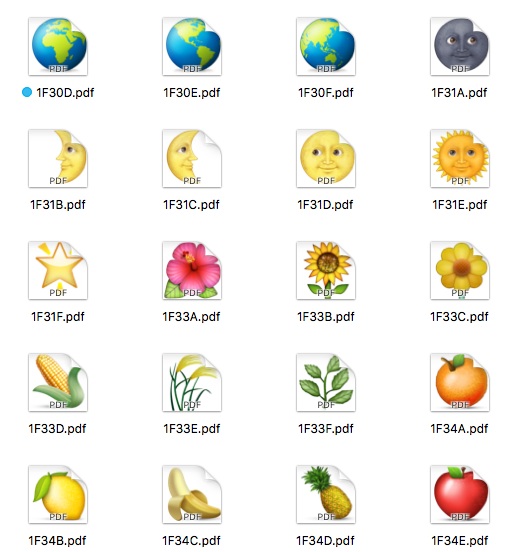
  3. Search the emoji-PDF files you need for your document
  4. Copy them to the folder where your .tex-document resides
  5. Define a shortcut/macro to include those emoji-PDF files you need
  6. Include the following code in your .tex-document
\usepackage{scalerel} % needed package to scale the pdf-images perfectly
\def\emojithumbup{\scalerel*{\includegraphics{emoji_thumbup_1F44D.pdf}}{O}}
\def\emojistar{\scalerel*{\includegraphics{emoji_star_2B50.pdf}}{0}}

In your document

This my five star rating
\emojistar\emojistar\emojistar\emojistar\emojistar
I would say \emojithumbup for this easy integration.

Update 17.09.2019

There is a quite interesting LaTeX Website called texample.net where you can see and learn lots of stuff about how to draw something in LaTeX. See following example:

Erreicht wurde das Ergebnis mit zwei Zusatzpaketen für TeX:

TikZ and PGF are TeX packages for creating graphics programmatically. TikZ is build on top of PGF and allows you to create sophisticated graphics in a rather intuitive and easy manner.

TikZ

Was ist TikZ? Nach dem Lesen der ersten Seiten des Manuals bin ich der Ansicht zumindest „T“ steht für Till Tantau den Entwickler. Und bei Wikipedia steht, es stehe für „TikZ ist kein Zeichneprogramm“. Das das eine Rekursion mit Henne-Ei-Problem ist scheint dem Entwickler egal.

With TikZ you get all the advantages of the “TEX-approach to typesetting” for your graphics:
quick creation of simple graphics, precise positioning, the use of macros, often superior typography. You also
inherit all the disadvantages: steep learning curve, no wysiwyg, small changes require a long recompilation
time, and the code does not really “show” how things will look like.
[…]
In practice, TikZ is the only “serious” frontend for pg

PGF

Was ist PGF? Jo, ich hab nach dem Überfliegen des Manuals (pgfmanual_3.0.1a) immer noch keine Ahnung wofür die Abkürzung steht. Typisch MathematikerInformatiker mal wieder.

It turns out that there are actually two layers below TikZ. […] most users will only use TikZ and almost no one will use the system layer directly […]

Why do I blog this? Because when I tried to integrate the coloremoji.sty class in my LaTeX document, I got a series of issues with conflicting textinput encodings not matching the one the coloremoji expects. This way your avoid any new encoding issues by directly integrating PDF-images which is what will happen anyway with that class. maybe you need to include \usepackage[pdftex]{graphicx} too.


Why I do not like group chat that much…

…someone – actually Jason Fried – wrote that down so I do not have to do this.

License https://openclipart.org/detail/118681/racing-wheel

In his posting „Is group chat making you sweat? — Group chat is like being in an all-day meeting with random participants and no agenda.“ he points out the things that matter most. (PDF as depublication protection)

I will cite only a small part of it here:

[…] You must really have something against persistent group chat as a primary method of communication? Yes, in most cases I do. And it’s only because we’ve been using it at 37signals/Basecamp for 10 years. I’ve seen the distraction, anxiety, stress, and misunderstanding it can cause, and those are things that can really damage people and an organization. […]

Why do I blog this? I have really tried to use things like e.g. Slack or Threema Groupchats. But it always ended with me abandoning the software completely or shutting down all notifications and only opening the applications occasionally. They are too much a distraction to me.

How to create and present a presentation in the 21st century

This will not be the usual stuff explaining to you how to use your Microsoft PowerPoint Software, I am sorry! Instead this will show you a workflow which is setup to make you independent of any tool vendor at maximum level.

The fails

I have seen too much shit happen to my presentations in the past. Even though I was a fan of Apple Keynote and once used PowerPoint to create presentations these times are over for me now. The reasons for this are the following:

  • A Microsoft Powerpoint file on a Mac has issues being presentend on a Windows machine
  • A Microsoft Powerpoint file on Windows has issues being presentend on a Mac machine
  • A Powerpoint file of version 3 cannot be opened by the latest & greatest Powerpoint software
  • An Apple Keynote file from the past cannot be opened with a Keynote app of the present
  • The file format of Powerpoint and Keynote is closed, proprietary and non-human-readable. That means if you never converted your old presentation to a PDF file you will never be able to read your files again.
  • The default mode of operation of Powerpoint and Keynote is to craft a proprietary presentation environment with lots of fancy effects, which mostly distract you from the content presented
  • Both Powerpoint and Keynote make it ridiculously difficult to connect a beamer (simple video out) to the software in a way that not disturbs the user with overcomplicated configuration of screen-sync-settings, screen-resolutions, main-screen, second-screen, super-duper-fancy-triple-screen, etc.
  • Both softwares fail ginormously when you want to present from your smartphone. you need custom software installed, you need custom hardware for the video out (sometimes even proprietary streaming protocol support, i.e. AirPlay), you need ridiculously complex steps to bring the document from your desktop to the smartphone using iTunes, iCloud, some $Dropbox Service or you even need to email the document to yourself to get it into the phone. Because the fucking manufacturer of your phone decided that Micro SD-Cards or USB-Sticks won’t work as a storage medium. FUCK YOU Apple!
  • Sharing your document (and the encoded knowledge) is completely NOT the priority of those companies. That is why export as PDF sucks and file format is proprietary bullshit.
  • Let me summarize: File formats suck, Desktop tools suck, Mobile tools suck, Presentation on Beamer sucks, Sharing of content sucks a huge lot!

Working toolchain

+ +
TexShop Pro
(Free Software on the Desktop)
Choose your favorite tool on Linux
PDF Viewer for iOS
(from PDFKit GmbH)
to present with iPhone
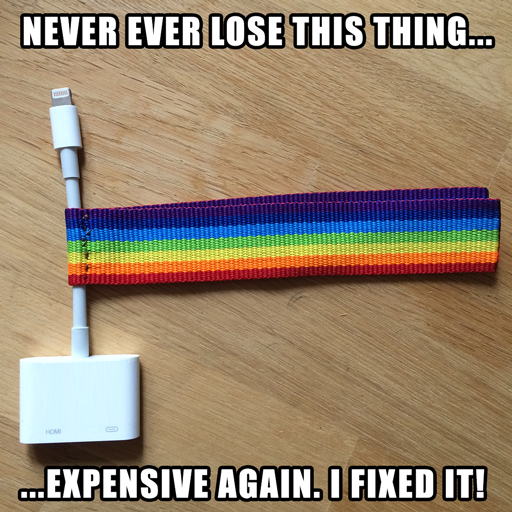
Lighting-to-HDMI-AV Adapter
(from Apple)
connect to iPhone and Beamer

How to

I now use TexShop Pro to create my LaTeX based presentation using the beamer-documentclass. This generates a nicely rendered PDF file. I copy that PDF to my iPhone (actually e-mailing it to myself) and import it into the PDF Viewer. As soon as you connect the AV-Adapter for HDMI-out the App will allow to present the PDF file in landscape mode by simply tapping. That’s totally sufficient for me because I hate all those effects anyway.

If I want to present from my Linux system I choose to use Impressive which is a really nice tool to present nearly anything (e.g. also a folder of images, pdfs, etc.) using nice effects. It has a lot of options to present exactly your style and it taes a lot of things for input, even movies. :)

Links

Here are some links to stuff which helped me to get this up and running.

Hint

The following lines are very helpful to setup your presentation for modern purposes.

\pdfminorversion=4
\documentclass[ngerman,aspectratio=169]{beamer}

Line 1 enforces LaTeX to output a PDF Version 1.4 file which is helpful for other software (e.g. the presenting PDF viewer) to cope with the format perfectly. Sometimes Version 1.5 is just not yet that well supported.

Line 2 sets the width of the presentation to use 16:9 format in aspect ratio, which makes use of the widespread beamers now in operation which support wide screens.

Guide

You really should read beameruserguide.pdf if you have some time to spend. It gives you a lot of insight on how to tweak your presentation.

Why do I blog this? I am fed up with all the tools mentioned above, because they break stuff for me often. Apple Keynote is a powerful tool, but without them supporting legacy documents adequately (what they don’t) that tool is dead for me. It will be just a matter of time until they kill the PDF export since normal consumers do not need keynote and products for Pro Users get slashed regularly in recent times by Apple Inc. this is it for me. I will go with free tools only. The AV-Adapter will be the most expensive thingy here but for the convenience of presenting with your iPhone this may be worth it for you.