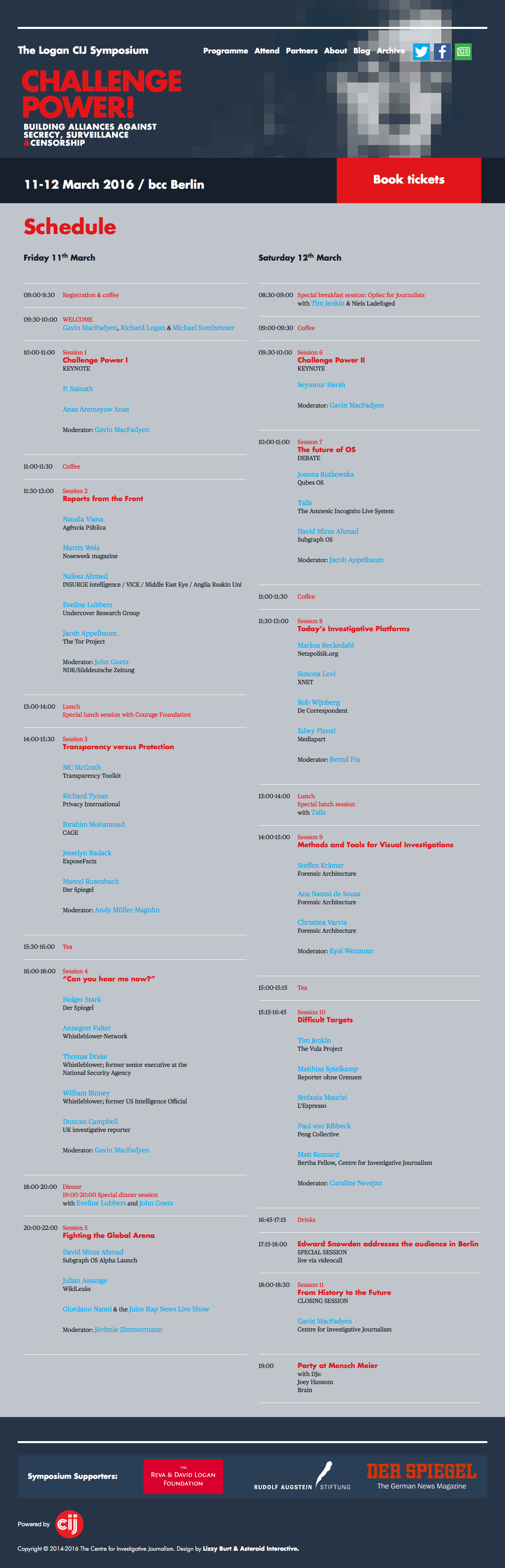
Session 1: Challenge Power I
Friday 11th March, 10:00 –11:00
We live in an era of social, economic and environmental crises; an era where war rhetoric and fear are being used to justify and increase control and surveillance. Physical and digital barriers are being erected both publicly and in secret to obscure the truth, so it is absolutely necessary to challenge power. Although highly technical research is often the methodology of choice for investigators, the acquisition of critical evidence also relies on methods both intensely personal and unique.
Anas Aremeyaw Anas employs anonymity and impersonation to enter into dangerous environments to capture stories of great power and impact at enormous personal risk. This award-winning journalist exposed injustice and cruelty all over Africa and Asia and will share insights about his world-changing work.
Session 2: Reports from the front
Friday 11th March, 11:30–13:00
While most mainstream newspapers are no longer committed to finance investigative journalism, new entities focused on revealing uncomfortable facts have managed to establish themselves and contribute significantly to the critical and charged debate. With a myriad of backgrounds and approaches, investigative enterprises are constantly being challenged to provide access to new information. Speakers from Africa, South America and Europe will demonstrate and discuss radical new methods to bring important disclosures to the public.
Session 3: Transparency and Protection
Friday 11th March, 14:00-15:30
How can journalists deal with increased surveillance? Governments and corporations are investing heavily in new intrusive surveillance capabilities. Those who challenge power are being directly targeted – be they hackers, journalists or activists. Strategies to counter increased surveillance include new technologies for transparency and new technologies for protection. Also, such strategies need to include a specific structuring of organisations, use of legal frameworks, and specific media strategies.
Session 4: “Can you hear me now?”
Friday 11th March, 16:00-18:00
Sources and whistleblowers have provided many of the most important scoops in recent decades. Having exposed critical information that the authorities have obscured or kept secret, these people have become the targets of intense and sustained attacks by governments, corporations and even criminal organisations. These speakers will reveal the dangers and consequences of their courageous actions.
Session 5: Fighting the Global Arena
Friday 11th March, 20:00-22:00
From journalists to techies, from artists to activists, from experts to entertainers; everybody is needed to fight for the right to privacy, transparency and revolution. Our special guests will present a spectrum of spectacular actions.
More than five years ago Julian Assange built a sophisticated submission system that both promised and delivered security for whistleblowers around the world. It has led to a virtual explosion of publicly accessible information that governments and corporations have desperately tried to conceal. Disclosures of corruption, mass murder and illegal governmental activities on a huge scale are now irretrievably in the public domain.
The battle began with WikiLeaks and expanded dramatically with the Snowden revelations. Sadly, the universality of surveillance has meant that conventional computer systems are so compromised and vulnerable that radical new solutions are required.
In defence of personal freedom and privacy, the Subgraph team has built a highly secure new operating system that will be launched at this session. This long awaited new OS will hopefully provide a framework of protection for the future.
Last but not least, Giordano Nanni will introduce the riotous cult satirical online series Juice Rap News which has helped expose hypocrisy and lies with rhymes and a humor that is recognised across the globe. For the first time in Europe, Giordano will be accompanied by NSA spokesperson General Baxter and conspiracy guru Terrence Moonseed who will perform some of their most popular episodes live on stage – in what will be Juice Rap News’s first (and possibly last) European live performance.
Diversity is key!
Session 6: Challenge Power II
Saturday 12th March, 09:30-10:00
Investigating crimes and wrongdoing even in nominal democracies requires independence and courage. Two of the world’s most successful journalists still experience difficulties in publishing their work in the mainstream media.
Seymour Hersh investigated the US M? Lai massacre of civilians, which more than any other piece of journalism helped to bring the Vietnam War to an end. Later in Iraq, he exposed torture, murder and crimes against humanity at the US military prison at Abu Ghraib. Despite countless prizes and awards, he has found himself excluded from most mainstream outlets. His latest investigation will be published this December (2015) in the London Review of Books.
Sainath Palagummi single handedly and courageously exposed major crimes in the Indian countryside where over 285,000 farmers have committed suicide. His work is widely read in Asia and he is the recipient of major awards for journalism. His work has included studies of the ignored and forgotten foot soldiers of the Indian independence movement.
Session 7: The future of OS
Saturday 12th March, 10:00-11:00
In an era of mass surveillance the need for independent, reliable and usable Operating Systems is fundamental. In previous times, political movements needed their own printing press for circumventing propaganda and repression. In the digital age we need independent Operating Systems to protect our freedom of speech and freedom of action. The creation of independent OS is both a technological challenge and a social, political and economic challenge. To protect and encrypt yet offer transparency of control, and make it easy to use for all of us, is a great challenge. Trusting hardware, software and organisational structure is an issue from building all the way to using the OS.
Session 8: Today’s investigative platforms
Saturday 12th March, 11:30-13:00
Seemingly every week, new platforms are emerging on the internet both sponsored by established media, as well as new organisations supported by philanthropy and/or novel revenue models. For the first time in years of decline, serious independent reporting is being seen again. A whole new journalistic repertoire is being developed in which people can inform each other and so unite in fighting injustice. Local or global, professional or grassroots, the actions of those who experiment with new ways of reporting have vital impact and often punch above their weight. In this session the actors will present the challenges they face.
Session 9: Methods and Tools for Visual Investigations
Saturday 12th March, 14:00-15:00
The Forensic Architecture group at Goldsmiths University in London is revolutionising investigative analysis. They will give a ‘roadshow’ of new and unique tools and methods. Building on architectural knowledge of the 3D physical world, the group demonstrates how the newest technologies can be used to deconstruct lies and myths by creating simulations that prove a specific argument or fact is false. Students and PhD candidates in forensics present a variety of research tools they are developing for unveiling truth in highly sensitive political situations.
Session 10: Difficult Targets
Saturday 12th March, 15:15-16:45
The NSA, BND, GCHQ, the Mafia, the Narcos and multinational corporations are all powerful targets that require especially creative and innovative investigative methods. These organised power structures have inexhaustible resources that cannot be competed with financially or technically. To have a chance to defeat these systems of power, we need to act with creativity, tenacity and courage. Effective ways to reveal the truth and outperform illegitimate power are key to reclaiming our fundamental rights to freedom, privacy and dignity. Our panelists have extraordinary stories to tell and will present their projects to inspire the audience.
Session 11: From History to the Future
Saturday 12th March, 18:00-18:30
After two days of intense focus on current and previous practices of journalism, activism and hacktivism, Gavin MacFadyen elaborates in this closing session on insights that emerged during the symposium and translates these, with help from the audience, into shared efforts and directions in the near future.