Ich habe ein wenig mit mir gehadert. Ich bin langjähriger Macintosh Freund gewesen. Die Marke Commodore Amiga und die Marke Apple haben mich die meiste Zeit meines Lebens rechnertechnisch begleitet. Und vor allem mit Apple verbinde ich viele tolle Erinnerungen.
Doch Apple hat sich verändert. Nicht nur dass man „Apple Computer Inc.“ in „Apple Inc.“ umbenannte, nein Apples für mich prägendstes Produkt, der General Purpose Computer, das „Fahrrad für den Geist“ (Depublikationsschutz PDF) hat sich peu a peu zu einem von Geldgier und Kontrollwahn geleiteten Gerät gewandelt.
 Die User Experience und Usability, einst das Aushängeschild der kalifornischen Firma, ist zu einem Schatten ihrer selbst verkommen. Ich dachte als Steve Jobs starb, nun, das wird schon nicht so schlimm sein, da existieren ja gewachsene Strukturen, die noch eine Weile gut funktionieren werden. Aber ich sehe mich eines Besseren belehrt durch den aktuellen Kurs.
Doch die reine Anwendersicht ist längst nicht der Teil, der jetzt den Ausschlag gab für mich „Nein“ zur Apple Watch zu sagen. Es ist eine ganze Summe an Ereignissen, die es für mich ethisch unvertretbar machen den einfachen Weg zu gehen und „Ja“ zu einem weiteren Produkt zu sagen. Dabei hatte ich wirkliche Hoffnungen für mein Produkt Seewetter Pro. Aber genug ist genug!
Enttäuschung

Ein Schlüsselwort ist dabei meine große Enttäuschung, wie mit mir als Kunde und Entwickler umgegangen wurde in den letzten 3 Jahren und immer noch umgegangen wird. Es wird nicht besser, es wird fortlaufend schlimmer!
Damit man sich da mal ein Bild von machen kann, habe ich einmal einige Dinge aufgelistet, die mich Stück für Stück immer weiter von der Marke Apple entfremdet haben:
- Aufkauf von SoundJam MP um es dann 1 Jahr später als Feature-crippled iTunes rauszubringen. Damals war SoundJam MP das coolste mp3-Abspielprogramm auf dem Mac mit dem man sogar ad hoc seinen eigenen mp3-Radiosender im Netz aktivieren konnte.
- Einstellung der Java-basierten WebApplication Lösung WebObjects und der zugehörigen Entwicklertools (WebObjects Builder & EOModeler), zumal diese Technologie offenbar intern bei Apple nach wie vor weiterlebt und von strategischer Bedeutung ist für den AppStore.
- Die seit Jahren vernachlässigte Überarbeitung des Finder für das Arbeiten im 21sten Jahrhundert im Zeitalter des Netzwerks. Der Finder ist überhaupt nicht mehr ausreichend für das Arbeiten am Mac.
- Das permanente unter-Druck-setzen der Händler mit teils absurden Zugeständnissen und damit mittelbar der Ruin vieler wirklich guter Servicedienstleister im Händlernetz in Deutschland (jüngstes Opfer M&M Trading Bremen). Jetzt bleibt de facto nur noch GRAVIS, was schlicht eine Katastrophe ist.
- Die lieblose, halbherzige und somit erfolglose Einführung und Umsetzung von iBooks und iBooks Author. Nicht nur, dass das Buchformat mit seinem gigantischen Speicherplatzbedarf vollkommen unpraktisch ist, nein, man schuf mit iBooks Author auch noch ein vollkommen inkompatibles Buchformat, das sich nicht an den ePub-Standard hält.
- Bislang kein einziges Gerät auf e-Ink-Basis mit dem man ausnahmsweise mal was in der Sonne lesen könnte ohne Schminkspiegel-Effekte
- Erst das Bekämpfen von „Echte Postkarten“-Apps durch Verbot der Nutzung des eigenen Bezahldienstes per Apple-ID, dann das klammheimliche Einstampfen der eigenen, offenbar unrentablen Postkarten App.
 Die völlig sinnlose Umstellung des gesamten optischen Erscheinungsbildes in iOS 7 mit massiver Vernichtung und Entwertung von vielen Stunden User-Learnings, Muscle Memory und erbrachten Entwicklerleistungen. Und dann noch dazu ein völlig überhasteter Rollout mit massiven Problemen bei der Umstellung des mobilen Betriebssystems für Kunden und Entwickler.
- Einführung des Lighting-Port (eines extrem teuren „Steckers“, der vielmehr ein komplexer Prozessor mit integriertem Hardware-DRM ist), der haufenweise existierendes Zubehör komplett nutzlos machte. Eine Umweltsünde die ihresgleichen sucht! Ja, der Stecker ist etwas komfortabler, aber das war es dann auch schon an Nutzen. Dafür funktioniert mein Stromadapter im Auto nicht mehr, das Audiodock meiner mobilen Audiobox, der extrem teure Apple-Adapter für den Beamer, das Apple-Adapter für den SD-Card-Slot für die Photos-App etc. pp.
- Immer weitere Verkrüppelung der MacBook Pro Modelle durch Eliminierung wichtiger Anschlüsse wie z.B. SD-Karten-Slot, extra Mikrofoneingang, Ethernet-Port, Firewire-Port, mehrere USB-Ports und nicht mehr austauschbare Massenspeicher & Akkus. Ich habe nichts dagegen die Consumer-Notebooks derart zu verkrüppeln, aber bitte nicht die Pro Modelle.
- Die Umstellung des Software-Update-Prozesses auf dem Mac auf eine Web-Anwendung (Mac AppStore), die bis heute extrem schlecht funktioniert.
- Die Auslieferungsform des Betriebssystems in einer Art und Weise, die es normalen Nutzern nahezu unmöglich macht, dieses in Form eines Software-Installers zu bekommen, um es auf beliebigen Volumes zu installieren.
- Die Einführung von Codesignierung für Mac Applications, so dass aus dem Internet geladene Software nicht mehr ohne weiteres funktioniert, die aber nach Expertenansicht keinerlei wirklichen Sicherheitsgewinn bietet sondern vielmehr zur Abschottung des Mac AppStore dient, der zugleich den darin angebotenen Apps massive Zugriffsbeschränkungen auferlegt, so dass viele sinnvolle Applications gar nicht erst angeboten werden können.
- Die bewusst betriebene Absenkung des durch die Kunden wahrgenommenen Preisniveaus für Software („everything free“) und durch das kostenlose Anbieten des Betriebssystems und die kostenlose Bereitstellung zahlreicher Apps über den AppStore betriebene Zerstörung des Marktes bzw. Preisniveaus für Apps die Geld kosten. Kürzlich fand sogar eine weltweite Apple-Kampagne statt die sich gegen Apps mit In-App-Purchase richtete.
- Die seit Jahren geforderte Möglichkeit für Entwickler „Bezahlte Updates“ im AppStore immer noch nicht bereitzustellen. Dies führt zu absurden und extrem kostenintensiven individuellen Zahlungslösungen mit In-App-Purchase, die sowohl für Entwickler als auch für Kunden nervig sind.
- Der permanente Feature-Creep in iOS, der dazu geführt hat, dass iOS 8.x nicht nur deutlich unübersichtlicher und langsamer ist als iPhone OS 2.0, sondern auch eine Menge technological debt aufbaut durch die Integration von Abhängigkeiten (iCloud, iCloud Drive, Keychain in the Cloud, Handoff, etc.).
- Die neue Strategie für jede denkbare Screengröße tatsächlich einen weiteren iPhone oder iPad-Klon rauszubringen (nur aus Profitgründen), mit dem Resultat, dass die Gerätevielfalt bereits bei der Entwicklung von Software unüberschaubar und komplett unhandhabbar für Entwickler wird.
- Die Abkehr von weniger ist mehr und die funktionale Verkrüppelung von Geräten zu Gunsten des „Design“ im Sinne von des Aussehens. Bestes Beispiel das goldene MacBook mit nur einem USB-Typ-C Anschluss.
- Die jahrelange Vernachlässigung des Bug-Reporting Werkzeugs radar.apple.com und die Nichtbearbeitung selbst schwerwiegender Bugs.
- Das jahrelange Herumdoktorn an Xcode, bei dem zahllose Dinge permanent kaputt gehen (von Settings, über Interfacebuilder Dokumente zu Code-Signierung) und die Komplexität ins Unendliche getrieben wird mit tonnenweise Optionsschaltern, ohne einmal eine neue Clean-Slate IDE anzugehen.
- To be continued…
Enttäuschung anderer
How to Become an Indie Developer
- Do you have a day job that pays you a full-time salary? If yes, proceed to Step 2. If not, skip to Step 3.
- Quit your day job.
- Do you have alternate income besides a job with a regular salary? A spouse with a well-paying career? At least forty-thousand dollars in a savings account? Stock options from that old job that IPO-ed last year? If you have any of these things, jump to Step 5. Otherwise, proceed to Step 4.
- You cannot become an indie developer. Ask for your day job back. Do not proceed to Step 5 or 6.
- Open Xcode.
- You are now an indie developer.
Veränderung
Ich habe prinzipiell nichts gegen Veränderung, sofern es Veränderung ist, um Dinge besser zu machen und nicht um ihres Selbstzwecks wegen. Doch einige Veränderungen die Apple vornimmt haben genau diesen Hintergrund, Änderung, nur um etwas anders zu machen, es wird nicht besser dadurch. Das Paradebeispiel ist die Einführung der neuen Programmiersprache Swift.
Swift löst kein einziges drängendes Problem, schafft hingegen zahllose neue Probleme. Zum Beispiel wird es jetzt eine ganze Weile sehr instabile Werkzeuge geben, sämtliche Literatur zu Objective-C wird obsolet und de facto entwertet. Jahrelange Erfahrung und das Wissen von erfahrenen Entwicklern und Lehrern wird auf Null entwertet. Da so schnell nicht alle Komponenten des OS auf Swift umgestellt werden können, wird es für lange Zeit eine Mischung aus zwei Sprachen geben mit entsprechenden Problemen dieser Mixtur. Swift entfernt explizit und ganz bewusst gestalterische Möglichkeiten in Objective-C die in der Vergangenheit aktiv für das „Patching“ bzw. die Problembehebung eingesetzt wurden (z.B. Swizzling). Für eine existierende Codebasis bedeutet Swift eine brisante Bedrohung, denn die jahrelange Investition in Objective-C-Code ist gefährdet einen kompletten Wertverlust zu erleiden in dem Moment, in dem Apple nur noch Software auf der Basis von Swift in seinen Vertriebskanälen und dem OS akzeptiert.
Eine gut abgehangene Programmiersprache mit ihren Frameworks und Codebeispielen hat hingegen zahllose Vorteile. Sie ist reifer und fehlerfreier, die Problemstellen sind bekannt und können gut umschifft werden. Es gibt massig Literatur und Tipps, es gibt Erfahrungswissen an Universitäten und in anderen Fortbildungsstätten für Entwickler. Es gibt zahllose Frameworks, die dem Entwickler große Teile komplexer Arbeit abnehmen können. Doch diese Vorteile ignoriert Apple einfach mal weg. Statt Objective-C weiterzuentwickeln und leistungsfähiger zu machen durch Ergänzungen, z.B. auch durch eine Verbesserung der Entwicklerwerkzeuge, schmeißt Apple einfach alles über Bord. Es ist schier unglaublich, aber dennoch wahr!
Zu den Veränderungen von iOS 7 bzw. iOS 8, dem Design und dem Wearable habe ich bereits alles gesagt, was es zu sagen gibt. Andere auch. Das wiederhole ich hier nicht nochmal. Doch auch hier gilt festzuhalten, dass es lediglich eine Veränderung um der Veränderung willen war. Noch dazu eine, die einen kulturellen Schaden hinterlassen hat. Die Schönheit in den Apps & Icons von iOS, die Apps voneinander unterscheidbar und besonders machte wurde weitgehend eliminiert. Jetzt herrscht grenzenlose Funktionalität, ohne Struktur mit fragwürdigen Gestaltungselementen wie z.B. dem frosted Glass-Effekt.
The American Dream Indie Boy
 Eine weitere große Enttäuschung ist das Platzen des amerikanischen Traums, den Apple erfolgreich seit iPhone OS 2.0 exportierte. Gegenstand dieses Traums war die Aussage, dass die Millionen iPhone Geräte einen neuen Absatzmarkt für exzellente Softwareprodukte schaffen würden, der quasi das neue Eldorado der Goldsucher darstellt. Befeuert hat man diese Traumstory mit einigen wenigen Entwicklern (i.e. Steve Demeter und sein Trism), die man aktiv hervorgehoben hat (Steve Jobs persönlich hat 2008 diesen Job übernommen) und ihre Geschichte stets so dargestellt hat, dass es ein Einzelner alleine schaffen (Rags to Riches) kann eine millionenfach erfolgreiche App zu entwickeln. Was für eine gigantische und zugleich brilliante Täuschung!
Steve Demeter wurde aufgebaut durch Apple zu diesem einen American Dream Indie Boy, der es als Einzelner geschafft hat Millionär zu werden mit einer App. Ein umfangreicher Artikel mit dem Titel „iPhone Developers Go From Rags to Riches“ (Depublizierungsschutz, PDF) wurde in der WIRED veröffentlicht. Auf der WWDC 2009 wurde die Success Story des Steve Demeter als Video (Depublizierungsschutz ) veröffentlicht.
Im Rückblick kann man klar erkennen, dass dieses Video eine ganz spezifische Aufgabe hatte: Es sollte Verführen. Es sollte unzählige Entwickler und Unternehmer in die Illusion des Goldrausch führen. Es sollte die Illusion transportieren dass alle es schaffen können, meinte aber insgeheim nur dass es jeder schaffen könne. Die klassische Geschichte des amerikanischen Traums. Exportiert durch ein amerikanisches Unternehmen.
Ist es Zufall, dass Steve Demeter als sportlicher junger Mann dargestellt wird? Mit körperlicher Fitness demonstriert auf einem Fahrrad? Ist es Zufall, dass an dem Whiteboard (lange nach dem die App bereits im AppStore ist) immer noch Skizzen der App Entwicklung sichtbar sind? Ist es Zufall, dass gezeigt wird wie jemand mit billigen bis kostenlosen Arbeitsmaterialien („my phonebill cut into pieces“) arbeitet? Ist es Zufall, dass erwähnt wird, dass er nachts statt zu schlafen an der App programmiert hat und dennoch am nächsten Morgen normal zur Arbeit ging? Ist es Zufall, dass Steve Xcode „fantastic“ findet? Ist es Zufall, dass Steve in dem Video quasi die gesamte Palette der Entwicklerwerkzeuge vorstellt und jedes Mal beteuert wie „easy“ das alles ist? Ist es Zufall dass er betont, dass er keine „big company“ ist, die sich keinen „big marketing plan“ leisten kann? Ist es Zufall dass Steve von einer „meritocracy“ spricht, wenn er das Bewertungssystem des AppStore zeigt? Ist es Zufall, dass er sagt „you can be a guy in the garage“ und damit an das klassische Silicon Valley Narrativ anknüpft eine Firma in der Garage zu gründen?
Vielleicht ist das alles Zufall. Wahrscheinlicher jedoch ist, dass es alles Absicht ist. Es soll die Geschichte des amerikanischen Traums adaptiert auf den Indie Boy, den unabhängigen amerikanischen Cowboy transportieren. Jeder kann es schaffen, auch du und du gewinnst Unabhängigkeit und kannst Millionär werden. Es ist Absicht, Leute! Dieses Video verfolgte einen ganz gezielten Zweck, den es auch erreicht hat.
Unter anderem auch durch die Mithilfe von Artikeln wie diesem hier: „A Woman Braves the Worldwide Developer’s Conference“ von Alexis Goldstein, einer Frau die Steve Demeter weiter nach oben trägt und der Geschichte den entscheidenden Spin gibt, dass auch Frauen es schaffen können. Mittlerweile ist Frau Goldstein (die ehemals High Speed Trading Software für die Wallstreet entwickelt hat, also mitnichten die naive Frau im Software Business ist als die sie im Artikel erscheint) eine Aktivistin gegen die Wallstreet. Man könnte auch sagen sie glaubt nicht mehr an den amerikanischen Traum.
The burst of a bubble
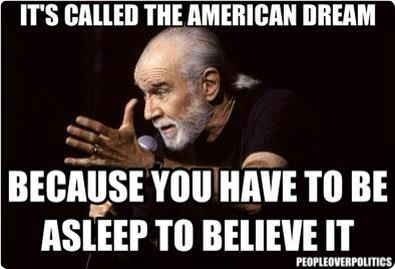 Dieser Traum ist jedoch mittlerweile geplatzt. Viele Getäuschte sind erwacht! Es stellt sich nämlich völlig überraschend heraus, dass man mit einer App weder Unabhängigkeit noch einen überdurchschnittlichen finanziellen Erfolg erzielen kann. Es ist sogar so, dass die überragende Mehrheit der Entwickler vollständig unwirtschaftliche Produkte produziert, massenhaft Verluste angesammelt hat und für ihre Investitionen in Geräte zum Testen, Equipment zum Entwickeln, Lehrbücher und eventuell sogar genommene Kurse keinerlei Return on Investment hat, der die Kosten decken würde. Sprich die Entwickler subventionieren den Verkauf von Apple’s Geräten mit hart erarbeiteter Software zu einem Preis, der nicht einmal ihre eigenen Kosten deckt.
Wo liegen die Ursachen für dieses Böse Erwachen bei den Entwicklern?
Wir sind auf Propaganda hereingefallen wegen Steve Demeter der von Steve Jobs zu einer „Scripted Reality Soap“ des American Dream verpflichtet wurde. Und vermutlich hat er dafür auch noch eine Menge Geld bekommen neben seinen angeblich großartigen App-Einnahmen. Er hat dieses Spiel offenbar tatsächlich entwickelt, aber viel mehr weiß man über die Details auch nicht.
Es gibt noch diesen Robert Soares und Edmundo Muyco die Designer, von denen einer auch kurz im Video auftaucht. Über alle Personen findet sich ansonsten nicht viel Verwertbares im Internet. Sie scheinen Personen ohne Vergangenheit zu sein. Das ist auffällig. Normalerweise würde man ja denken, jemand der mit Softwareentwicklung so einen Erfolg hat, hat vorher schonmal irgendwas entwickelt das eine Spur im Netz hinterlassen hat. Es scheint extrem unwahrscheinlich, dass man mit seinem ersten Programmierversuch Millionär wird ohne eine Vergangenheit zu besitzen.
Und wie kam der Herr Demeter darauf einen Leveldesigner einzustellen und wie kommt es, dass er dennoch angeblich alles in seiner Freizeit gemacht hat?
Bohrt man ein wenig findet man dieses hier: „Prior to this he has worked in the games industry dating back to the 90s, creating games for handheld devices such as the Gameboy Color and Gameboy Advance.“ (Quelle)
Herr Demeter ist also ein langjähriger Spieleentwickler für den Gameboy gewesen. Das wird bewusst verschwiegen. Sein Erfolg kommt also nicht aus dem Nichts, sondern weil er auch sonst schon erfolgreiche Spiele entwickelt hat. Weil er genau weiß wie man ein Spiel entwickelt das funktioniert. Wer das Video also angesehen hat denkt sich: „Wow, was dieser Steve Demeter kann, das kann ich auch!“, denn das Video erweckt den Eindruck als sei es kinderleicht in kürzester Zeit ein Spiel zu entwickeln. Doch das ist falsch!
Aktuell ist Herr Demeter Berater und/oder Investor bei Tip’d off und bezeichnet sich dort selbst als „Apple’s first app millionaire“.

It’s Franchising idiots!
Das größte Missverständnis ergibt sich durch den Mythos der Unabhängkeit bzw. des sogenannten „Indie-Developer“, der die Kurzform des Independent Developer bezeichnet. Auf hunderten von Konferenzen bezeichnen sich Leute als „Indie“ oder kündigen an ein „Going Indie“ durchzuführen, womit jedoch tatsächlich gemeint ist, ein Franchisenehmer bei Apple zu werden.
Es hat nichts mit der deutschen Selbstständigkeit zu tun, wenn man dem Ruf des „Going Indie“ folgt und Franchisenehmer wird. Absolut gar nichts! Dazu eine kurze Definition von Franchising:
„[…] franchisors are able to sell franchises and expand rapidly across countries and continents using the capital and resources of their franchisees while reducing their own risk.“
Wodurch zeichnet sich Franchising genau aus?
Sowohl der Franchisegeber als auch der Franchisenehmer sind selbstständige Unternehmer. Sie arbeiten in eigenem Namen und auf eigene Rechnung. Der Franchisegeber hat lediglich richtlinienähnliche Kompetenzen, die es ihm ermöglichen, systemkonformes Verhalten durchzusetzen
Das trifft auf Apple Developer zu, sie treten als eigenständige Unternehmer auf, müssen sich allerdings einem weitreichenden Regelwerk unterwerfen. Von den Apple Entwickler Richtlinien bis hin zu den AppStore Guidelines und vielen anderen Verträgen, die sich um die Verwendung von Markensymbolen etc. drehen, unterliegt der Entwickler Apple’s Regeln. Das Risiko mit entsprechenden Vorleistungen trägt allerdings vollständig der Entwickler selbst.
Die Organisation eines Franchisesystems zeichnet sich zum einen durch seine vertikale Struktur aus, d.h. der Franchisegeber erstellt und überlässt dem Franchisenehmer das bewährte Geschäftskonzept, das wiederum dessen unternehmerischen Erfolg sichert. Für Franchisegeber und Franchisenehmer bedeutet dies eine faire Erfolgsbeteiligung.
So sollte es eigentlich sein, so ist es jedoch nicht. Der unternehmerische Erfolg ist alles andere als gesichert, da es bereits vollkommen ungewiss ist, ob Apple eine App überhaupt zulässt zum AppStore. Eine rechtliche Handhabe ein Produkt in den AppStore zu bekommen hat keiner der Franchisenehmer.
Zum anderen zeichnet sich die Organisation durch eine komplementäre Arbeitsteilung aus, die eine gruppeninterne Spezialisierung ermöglicht: jeder konzentriert sich auf das, was er am besten kann. Der Franchisegeber hat eine richtlinienähnliche Kompetenz inne, die das systemkonforme Verhalten aller Beteiligten ermöglicht. Die Selbstständigkeit des Franchisenehmers wird dadurch nicht berührt.
Apple kümmert sich zum Beispiel um die Abrechnung und die Bereitstellung über die Vertriebsinstrumente AppStore und Mac AppStore.
Das einheitliche Auftreten des Systems stärkt nicht nur das Gesamterscheinungsbild, sondern auch die Marke und das Image des Systems, zudem wird der Bekanntheitsgrad gesteigert. Der einheitliche Auftritt und das Image des Franchisesystems sind wesentliche Erfolgsfaktoren und tragen erheblich zum Vertrauensverhältnis zwischen Franchisegeber und Franchisenehmer bei.
Apple reglementiert hier das Auftreten bis ins kleinste Detail. Wie Icons auszusehen haben oder Screenshots oder Vorschaufilme, alles ist exakt festgelegt. Die Erwähnung fremder Marken in einem Beschreibungstext ist z.B. vollständig ausgeschlossen. Welche Icons innerhalb von Apps wie eingesetzt werden ist ebenso vorgegeben, wie die Betriebssysteme, die unterstützt werden müssen.
Die vertragsrechtliche Bindung der Partner ist grundsätzlich auf eine längerfristige Zusammenarbeit ausgerichtet. Diese Dauerhaftigkeit schützt Franchisegeber und Franchisenehmer vor einer kurzfristigen ordentlichen Kündigung. In den meisten Fällen bedeutet gerade für den Franchisenehmer eine solche Kündigung den Entzug der Existenzgrundlage.
Apple weicht hier von gängigen Franchisemodellen ab, denn der Franchisenehmer hat keinerlei Kündigungsschutz, zwar gilt sein Entwickleraccount für ein Jahr, aber es ergeben sich keinerlei Anspruchsrechte daraus. Die gesamte wirtschaftliche Existenz liegt zu jedem Zeitpunkt in Apples Händen. Ein Zustand den niemand bei klarem Verstand akzeptieren würde. Jeder angestellte Arbeitnehmer in Deutschland ist besser dran, denn er hat Rechte im Falle einer Kündigung!
Während der fest vereinbarten Laufzeit ist daher für beide Seiten nur eine fristlose Kündigung aus wichtigem Grund möglich. Eine lange Vertragslaufzeit ermöglicht dem Franchisegeber die längerfristige Planung des gesamten Systems. Dem Franchisenehmer ermöglichen lange Vertragslaufzeiten die nachhaltige Existenzsicherung und den eigenen Kapitaleinsatz zu erwirtschaften. Dem Franchisenehmer dient der – zuvor mit dem Franchisegeber abgestimmte – Verkauf seines Unternehmens als Altersvorsorge
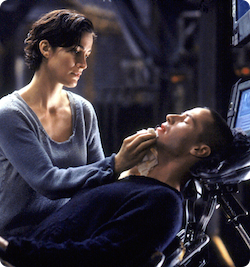 An eine Alterssicherung die auf die fragile Beziehung zu dem Franchisegeber Apple basiert ist überhaupt nicht zu denken. Denn jederzeit kann Apple den Stecker ziehen. Es ist wie in dem Film „Die Matrix“, zieht jemand den Stecker während derjenige gerade in der Matrix ist, ist seine Existenz ausgelöscht. Passiert das mit einem Entwickler, der gerade viel in ein Produkt investiert hat, ist seine Existenz genauso zerstört. Das Gleiche ist übrigens schon oft passiert und nicht nur bei Apple sondern genauso bei Google. Allerdings bei Google mit deutlich mehr Nebeneffekten.
Fazit
Das Resultat dieser Erkenntnis kann nur eine Konsequenz haben. Hört auf damit das Märchen vom Indie Developer weiter zu verbreiten. Es gibt hier nichts zu gewinnen, außer der teuren Erkenntnis, dass es sich um ein Franchise mit extrem schlechten Bedingungen für den Franchisenehmer handelt. Es sollte auch niemand diese Plattformen nur so zum Spaß mit kostenloser Software versorgen, denn das macht es den im Franchise bereits gefangenen Entwicklern nur noch schwerer zu überleben. Sie müssen dann mit kostenlosen Apps konkurrieren.
Für Entwickler, die bereits massiv in die Plattform investiert haben, kann es nur eine Richtung geben: Peu a peu die Abhängigkeit verringern und existierende Produkte auf eine völlig andere Basis stellen oder letztlich ganz aufgeben. Es gibt viele sinnvolle Wege ein nachhaltiges Business aufzubauen, ohne sich in solch einseitige Abhängigkeiten zu begeben.
Wer sich erfolgreich befreit gewinnt seine Entwicklerpersönlichkeit zurück. Man kann wieder aufrichtig in den Spiegel schauen und an seiner wirklichen Unabhängigkeit arbeiten.

Das Modell AppStore ist mausetot. Es ist ein ausbeuterisches, extrem unfaires Franchise, das dem Entwickler & Anbieter keinerlei Rechte gibt aber sämtliche Risiken aufbürdet und somit hochgefährlich und gefährdend für die eigene Existenz ist. Man begibt sich in eine Sackgasse aus der es kein Entrinnen mehr gibt ohne massive Verluste.
Wer es gerne anders formuliert hätte, ich hab hier noch eine Alternative Formulierung für den geplatzten Indie Traum:
How to Become an Indie Developer
- Do you have a day job that pays you a full-time salary? If yes, proceed to Step 2. If not, skip to Step 3.
- Quit your day job.
- Do you have alternate income besides a job with a regular salary? A spouse with a well-paying career? At least forty-thousand dollars in a savings account? Stock options from that old job that IPO-ed last year? If you have any of these things, jump to Step 5. Otherwise, proceed to Step 4.
- You cannot become an indie developer. Ask for your day job back. Do not proceed to Step 5 or 6.
- Open Xcode.
- You are now an indie developer.
by Jared Sinclair | 14 JUNE 2015
Phasen der Veränderung & Trauer
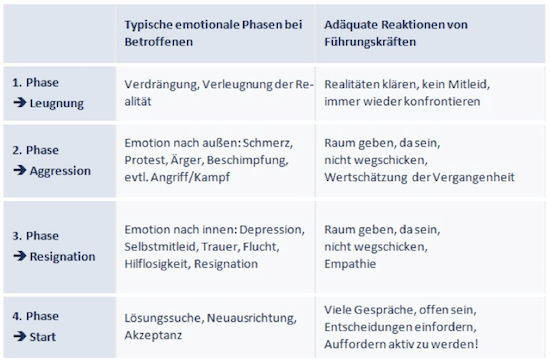
Ich denke, an dieser Stelle ist solide Trauerarbeit gefragt, sofern man nicht der Ansicht ist, diese Veränderung ließe sich noch irgendwie bewältigen. Nach den gängigen Phasen der Trauer befinde ich mich bereits in Phase drei. Das nicht wahrhaben wollen und die Wut haben jetzt bereits fast zwei Jahre angedauert. Eine viel zu lange Zeit!
Erste Phase
Nicht-Wahrhaben-Wollen: Der Verlust wird verleugnet, der oder die Trauernde fühlt sich zumeist empfindungslos und ist oft starr vor Entsetzen: „Es darf nicht wahr sein, ich werde erwachen, das ist nur ein böser Traum!“ Die erste Phase ist meist kurz, sie dauert ein paar Tage bis wenige Wochen. Aber je unerwarteter der Tod auftritt, umso länger dauert meist die Bewältigung dieser ersten Phase.
Zweite Phase
aufbrechende Emotionen: In der zweiten Phase werden durcheinander Trauer, Wut, Freude, Zorn, Angstgefühle und Ruhelosigkeit erlebt, die oft auch mit Schlafstörungen verbunden sind. […] Das Erleben und Zulassen aggressiver Gefühle hilft dem Trauernden dabei, nicht in Depressionen zu versinken. Weil in unserer Gesellschaft Selbstbeherrschung ein hoher Wert ist und abhängig von familiären und gesellschaftlichen Prägungen sogar die Tendenz bestehen kann, Trauer ganz zu verdrängen, bestehen oft große Schwierigkeiten, diese Phase zu bewältigen. Indem die adäquaten Emotionen auch tatsächlich erlebt und zugelassen werden, kann die nächste Trauerphase erreicht werden.
Dritte Phase
suchen, finden, sich trennen: In der dritten Trauerphase wird der/das Verlorene unbewusst oder bewusst „gesucht“ […] Mit der Wirklichkeit konfrontiert, muss der oder die Trauernde immer wieder lernen, dass sich die Verbindung drastisch verändert hat. Bisweilen kommt es in der dritten Phase auch zu Wutausbrüchen.
Vierte Phase
neuer Selbst- und Weltbezug: In der vierten Phase ist der Verlust soweit akzeptiert, dass der/das Verlorene zu einer inneren Figur geworden ist. Lebensmöglichkeiten, die durch die Beziehung erreicht wurden und die zuvor nur innerhalb der Beziehung möglich gewesen sind, können nun zum Teil zu eigenen Möglichkeiten werden.
Dass jede Beziehung vergänglich ist, dass alles Einlassen auf das Leben an den Tod grenzt, wird als Erfahrung integrierbar. Idealerweise kann man sich dann trotz dieses Wissens auf neue Bindungen einlassen, weil man weiß, dass Verluste zu ertragen zwar schwer, aber möglich ist und auch neues Leben in sich birgt.
Quelle: Wikipedia Mai 2015
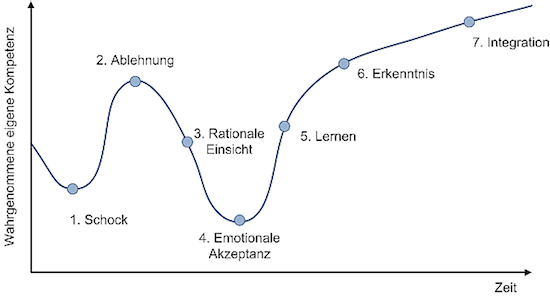
Die 7 Phasen der Reaktion auf Veränderungen
Apple würde sich sicher eher wünschen, dass die Reaktionen auf (harte) Veränderungen dem typischen einem Verlauf folgt, bei dem das verbesserte, veränderte Verhalten erst nach Durchlaufen einiger Phasenschritte erreicht wird.
Quelle: Peter Johann Consulting
Auch andere glauben weiterhin die typische Satir-Change-Model-Veränderungskurve zurückgehend auf Virginia Satir würde es schon richten…
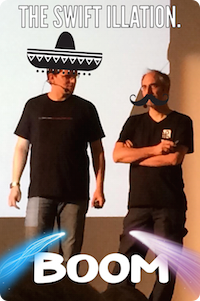 It will be Swift — and Painless?
Swift wird wohl mittelfristig der Tod von Objective-C sein. Aber warum forciert Apple eine neue Sprache? Dieser Vortrag zeigt, was Swift als nächsten Schritt nach Objective-C interessant macht, beleuchtet aber auch die rauen Ecken, die uns bei der Umgewöhnung am meisten Schmerzen bereiten.
Quelle: Vortrag als PDF
Hier wird also eine Art Mittelweg zwischen Trauer und Veränderung vorgeschlagen. Damit kann ich mich nicht anfreunden. Die Beziehung zu Apple ist für mich durch die oben genannten Faktoren viel zu belastet, als lediglich der auf lange Sicht einschneidende Schritt der Einführung von Swift.
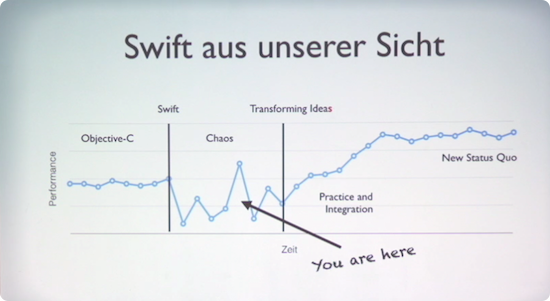
Quelle: It will be swift! – And painless? (MP4 Video)
Vortrag von Alexander Below und Tammo Freese auf der Macoun 2014
Von Frauen lernen

Auftragsarbeit
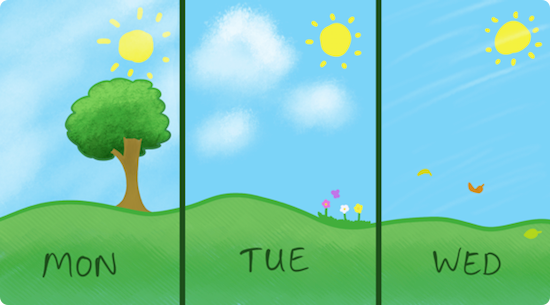
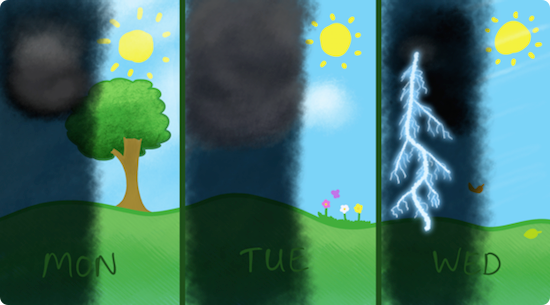
Oh, da hätte ich ja fast etwas vergessen, Auftragsarbeit bzw. abhängige Beschäftigung. Dazu gibt es gerade einen tollen Blogpost. Darin illustriert Eevee wie eine Arbeitswoche normalerweise aussehen sollte und wie sie mit einem Vollzeitjob aussieht.
NORMAL:
VOLLZEIT:
Und es gibt da einen entscheidenden Punkt der Einsicht in dem Post:
I’ve only worked for two tech companies, in radically different fields. The only things they have in common are that their main products are websites with tertiary features that let you buy things. Yet both of them ended up scrambling to write their own payment platforms from scratch. What the fuck is going on?
Meine Einsicht, die speziell den IT Sektor betrifft schaut so aus:
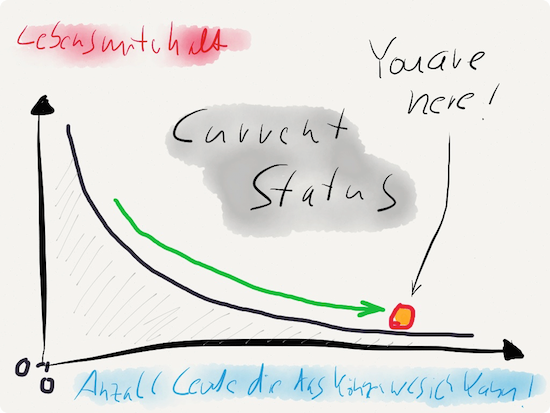
Ganz so krass ist es nicht, es gibt nicht soviele Leute die wirklich das können, was ich kann. Ich kann schon eine Menge besondere Dinge. Dennoch können mehr und mehr Leute Dinge die mit meiner Arbeit zu tun haben. Durch swift-Zwang wird nun z.B. mein gesamtes Objective-C-Wissen entwertet und ich kann zwar noch Dinge in Objective-C aber nicht in swift. Da aber nur noch swift existieren darf wird mir quasi die Existenz verweigert. Also alles ganz toll so im Großen und Ganzen!
Selbst Top Qualitätssoftware zieht sich zurück
Wie man hier lesen kann…
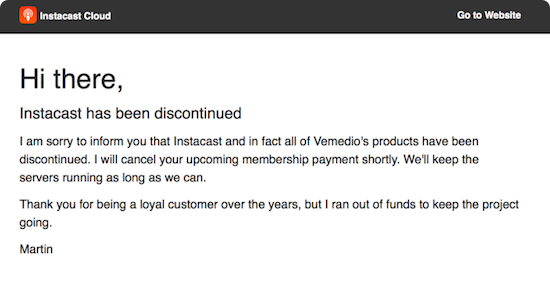
…wird der Rückzug selbst „erfolgreicher“ Apps im AppStore nur noch lapidar mit dem Kommentar „ITS TOUGH ON THE APP STORE®“ bedacht. Die Franchising-Konkurrenz freut sich über einen Franchisenehmer weniger im Pool, an der Situation ändert das allerdings nichts.
Die Webseiten, die den Rückzug kommunizieren könnten trauriger nicht aussehen:

Post WWDC 2015
Ich denke nicht, dass Apple sich im Augenblick bewusst ist, wie sehr sie gerade Entwickler und deren langjährige Loyalität verlieren. Ich war ein wirklicher Fan, da kann man meine Familie und viele Freunde fragen. Ich war Apple Fan als es unpopulär war Apple Fan zu sein, als man dafür ausgelacht wurde weil man ja einen „Frauencomputer“ benutze der nur „Klickibuntizeugs“ kann und dazu überteuert war. Aber ich habe das Enablement-Potenzial der Maschinen gesehen und fand es großartig.
Macs haben Dinge ermöglicht, die für Normalsterbliche bis dato unmöglich waren. Der Mac war mehr als bloß ein Computer, er ermöglichte neue Dinge wie z.B. Desktop-Publishing und ermunterte dazu Dinge selbst zu erstellen. QuickTime war damals noch darauf ausgelegt, per Copy & Paste Filmschnipsel beliebig hin- und herkopieren zu können. Das funktionierte einfach! Das geht heute gar nicht mehr. Auch gab es den Apple Desktop Bus (ADB), eine serielle Schnittstelle, um Tastatur und Maus anzuschließen. Man konnte den Mac mit einer Taste auf der Tastatur anschalten. Das geht heute auch nicht mehr durch USB. Aber lassen wir das, wir sind in der Gegenwart, und die ist grausam.
Benedikt Evans schreibt: „For Apple, I’d suggest the fear is that the developers leave.“ und er begründet das mit der „Nahtod-Erfahrung“ die Apple bereits einmal hinter sich hat, als die Entwickler in Scharen davonliefen damals. Ich denke, diese Nahtoderfahrung liegt offenbar zu lange zurück, obwohl Tim Cook zumindest einen großen Verdienst an der Wiedergenesung Apple’s hat. Zwei wesentliche Dinge sind Apple abhanden gekommen neben dem unersetzlichen Steve Jobs, und das ist Scott Forstall einerseits und die Fokussierung andererseits.
Scott Forstall hatte es wie kein zweiter geschafft ähnliche Qualitäten wie Steve zu entwickeln. Er hat die kompromisslose Ausrichtung auf Kundeninteressen und Einfachheit exakt verstanden. Zudem hat er das Talent bewiesen auch in einer Keynote wie Steve Jobs die Leute in seinen Bann zu ziehen und er konnte die Vorteile superb kommunizieren. Scott hat viel von Steve gelernt! Und Meiner Ansicht nach ist er der wertvollste Mitarbeiter nach Steve Jobs gewesen. Denn nur er hat das Besondere an Apple wirklich kompromisslos vertreten und gelebt. Es ist Tim Cooks größter Fehler gewesen diesen Mann nicht auszuhalten, sondern stattdessen kaltzustellen.
Der fehlende Fokus wird sich in Kürze in vielen kleinen Desastern zeigen. Apple TV, Apple Watch, Apple Music, Connect (als aufgewärmtes Ping), die News App (als recycled iBooks), CloudKit JS, das kein Entwickler, der noch ganz bei Verstand ist je einsetzen wird und nicht zuletzt das immer weiter verkrüppelte OS X. Es sind also mittlerweile ganze vier OS-Stacks (TV, Phone, Watch, Computer) zu managen und in Synchronisation zu bringen. Eine aussichtslose Herkulesaufgabe in der sich exponentiell viel Technical Debt ansammelt, an der entweder Apple versterben wird oder aber ganze Produkte früher oder später kaputt gehen.
Im Augenblick überspielt Apple diese monströsen Fehlentscheidungen noch durch exzellentes Personal. Sie heuern nur die Besten der Besten an und die müssen die jetzt schon nahezu unlösbaren Aufgaben lösen. Doch auch diese Superhirne werden früher oder später feststellen, dass sie sich in ein komplexes Gestrüpp reinmanövriert haben, aus dem sie sich nur noch mit der Machete befreien können werden. Ich halte mich auch nicht gerade für auf den Kopf gefallen, insbesondere habe ich ein ziemlich gutes Gespür über die Jahre entwickelt, wann Software zu komplex und damit unwartbar wird. Was Apple derzeit tut ist die schrankenlose Erhöhung der Komplexität und Schaffung von gegenseitigen Abhängigkeiten, die früher oder später unkontrollierbar werden. Kontrolle und Fokussierung auf das Wesentliche war mal Apple’s Kernkompetenz.
Ich sage deshalb „Apple’s größte Angst ist der Verlust der Kontrolle.“ doch genau daran arbeiten sie gerade mit Hochdruck. Sie bekommen ihre Geister die sie riefen nicht mehr in den Griff. Das wird auch an Beispielen wie diesem hier (Depublizierungsschutz PDF) deutlich, bei dem Apple sich einfach am Content anderer ungefragt bedient und stillschweigend Zustimmung voraussetzt. Aber auch die kontinuierliche Verkrüppelung bzw. iOS-ifizierung des Mac ist ein ebensolches Zeichen. Sie setzen die Kontrolle jetzt nur noch da durch, wo es für sie einfach ist, nämlich die Kunden in der Nutzung der Produkte einzuschränken oder den Produktnutzen selbst zu beschneiden, so dass man öfter neu kaufen muss und mehr kaufen muss. Die Kontrolle über die Komplexität ihrer Produktpalette haben sie aus meiner Sicht bereits vollständig verloren. Das waren genau die Dinge, die Apple einst die Nahtoderfahrung bescherten, zig Modelle, und keine Fokussierung mehr.
Und so im Allgemeinen
IDIOTS from BLR_VFX on Vimeo.
It’s not a secret we love robots here at BLR, so we wanted them to be the heroes in our latest promo clip. Luxury cars with powerful engines to drive through roads under severe speed restrictions, cable TV that allows us to pay to watch all kind of sports, all from our comfortable sofa, and of course, hyper expensive cell phones that do almost everything but making a decent phone call.
Yes, our happiness is based on things we don’t need and governed by entities we don’t control, so what? Sit down and turn on the tv!
The robots were taken from real Japanese robot model kits, and they now hold a privileged position in our freak museum. The bad guy spits real smoke out of its mouth! The environment is made of cardboard houses that were integrated with the help of camera tweaks. It all serves to the purpose of creating a dumb homogeneous atmosphere in which we’re defined by what we’ve got, that is, the same lame things.
Don’t take the message too seriously. This is a promo video we’ve done to laugh at ourselves. We all have an i-diot inside, and it’s so fun!
————————————————————-
A tale by Big Lazy Robot VFX
Music and sound design by Full Basstards
Update zum neuen Apple TV 4th Generation
Was Apple mit dem neuen Apple TV getan hat ist nicht mehr witzig. Sie haben einfach alle alten Apple TV Geräte auf das Abstellgleis geschoben. Die gesamte installierte Apple TV Basis an 2. und 3. Generation wurde einfach zu Elektroschrott erklärt. Denn eines ist klar, mit dem tvOS mit dem jetzt Apps auf dem Apple TV Einzug halten die von vielen entwickelt werden können, sind die alten Geräte abgemeldet. Sie bekommen kein Softwareupdate mehr und sind damit End of Life wie man so schön sagt.
Doch was ist eigentlich der Reiz an einer weiteren Settopbox? Liefert Apple besondere, andere TV, Kino & Serieninhalte? Nein. Liefert Apple besonders tolle, andere und schöne Entertainmentspiele? Im Vergleich zu den Spielekonsolen sicherlich kaum. Wo also schlägt das teure Apple TV Gerät jetzt meinen günstigen amazon fire TV Stick?
Apple hat eine neue Fernbedienung entwickelt mit Touchpad, Gyroskop und Mikrofon für Siri. Die Spracheingabe hat amazon auch schon. Die Fernbedienung ist ganz gut gelungen, obwohl sie mindestens einen Knopf zuviel hat (den mit diesem komischen TV Symbol). Hätte man diesen Knopf weggelassen, hätte man eine ganz klare Home/Back-Taste gehabt (Home: einfach lange gedrückt halten; Back: Einfach klicken). Stattdessen gibt es jetzt diese verwirrende Taste.
Das tvOS ist einigermaßen übersichtlich, der AppStore hingegen eine klare Katastrophe für Entwickler. Apps können nicht vernünftig gefunden werden, denn das Browsen nach Kategorien gibt es (noch?) nicht.
Damit kommen wir zum Thema, warum auch ein Investment in die Apple TV Plattform eine extrem schlechte Idee ist als Entwickler:
- Die Plattform hat für Kunden keinerlei komparative Vorteile gegenüber Mitbewerbern (im Gegenteil, der Lockin in Apple’s Ökosystem vergrößert sich nur dadurch)
- Die Box ist ein Zwitter aus Filme & Serienguckmaschine und Gamekonsole, allerdings ist beides durch diesen Tausendsassa-Ansatz nicht gerade überragend (es liegt nichtmal ein richtiger Gamecontroller bei; Serien haben nichtmal Trailer bei Apple)
- Die Anzahl Kunden und damit der potenzielle Markt für App Developer liegt zunächst bei Null möglichen Kunden. Es müssen erstmal viele Leute ein Apple TV kaufen, und von denen dann welche die Apps. Das dauert…
- Das Gerät ist so konstruiert, dass es ähnlich wie amazon fire TV einfach nur HDMI als Signal bereitstellt. Hat das TV Gerät nur einen HDMI-Eingang ist damit eine Koexistenz mit anderer Hardware (z.B. Spielkonsole) unmöglich. Ein durchschleifen einer existierenden HDMI-Quelle wäre eine Innovation gewesen und eine Inroad zur Koexistenz.
- Die Texteingabe ist auf der Box sowas von selten dämlich gelöst, dass man mit dem Kopf auf den Tisch hauen möchte. Wer bei der Passworteingabe für Account & Wifi nicht dreimal wild schimpft, hat vermutlich ein schlechtes Passwort für beide Accounts. Warum man kein iPhone oder ein Bluetooth Keyboard als Texteingabe/Tastatur nutzen kann (wie in vorherigen Apple TV Modellen), bleibt einem völlig unverständlich.
- iOS & tvOS vermischen sich ganz komisch. Plötzlich kann man iOS/TV-Universal Apps rausbringen die sowohl auf Apple TV als auch auf iOS laufen. Huh!? Eine weitere Falle in die man nicht tappen sollte (Universal App & 2 Binaries). Dass Kunden wieder einmal nur für EINE App zahlen sollen, obwohl der Entwickler Arbeit für beide Apps hatte ist wieder einmal Apple’s geschickter Schachzug dem Entwickler noch weniger Geld zu geben, da er für eine Plattform dann natürlich kostenlos seine Entwicklungsleistung erbringt.
- Das Apple TV ist in keiner Weise vergleichbar mit dem universalen Alleskönner iPhone. Es ist ein sehr spezielles Gerät, ein unfokussierter Zwitter noch dazu. Das Businessmodell steht auf extrem wackeligen Füßen, denn im Bereich Kino/Serien wird Apple keinen besseren Deal bekommen wie amazon. Das App-Ökosystem wird weiter ausbluten und nur noch kostenlosen & ethisch fragwürdigen In-App-Kauf-Schund bereitstellen, da zudem die Kosten zu hoch sind für die Entwickler und Apple auch hier prozentual am Umsatz des Entwicklers weiterhin beteiligt werden möchte, ein klares „Nein“ von mir.
Mein Fazit: Apple TV ist ein unfokussiertes und unausgegorenes Produkt ohne Ziel, somit ein Millionengrab. Wer dafür eine App entwickelt ist entweder von einem Content-Outlet (wie z.B. großer TV Sender) dazu beauftragt worden, hat ein interessantes Nischenhobby gefunden, oder aber er hat eine businesstechnisch krasse Fehlentscheidung getroffen.
Why do I blog this? Das ist für mich aktive Trauerarbeit. Manche schreiben ein Buch, wenn sie einen langjährigen Partner verloren haben. Ich schreibe einen Blog-Post. Es hilft mir mich endgültig zu trennen und die vierte Phase zu erreichen, mich auf etwas Neues einlassen zu können.



 Bodo Ramelow plädiert für neue Nationalhymne